Map Catalogs First: Enterprise 5 Step BigCommerce Multi Storefront Rollout

BigCommerce Multi-Storefront lets one BigCommerce backend run multiple branded or regional storefronts from a shared catalog, pricing engine, and order system. Choose it when you’re managing multiple brands, splitting B2B from B2C, or expanding into new regions and need centralized operations without rebuilding your product data for every storefront. It’s overkill for a single-brand shop with no plans to launch a second storefront.
TL;DR:
- Each storefront supports up to 25,000 products, with international features requiring up to 24 hours for full activation, affecting launch timelines.
- Correct mapping of channel and site pairing is critical to prevent issues like currency mismatches, promotion leaks, and navigation errors.
- Apps can be either globally applied or storefront-specific, so verifying compatibility and configuration scope is essential before installation.
- Running a multisite rollout requires thorough prerequisites verification, proper data mapping, testing in staging, and careful permission management.
- Enterprise-level complexity, such as large catalogs or headless frontends, often necessitates outside engineering support to ensure a smooth deployment.
Table of Contents
- What Does BigCommerce Multi-Storefront Actually Do?
- Are You Eligible? Prerequisites and Platform Limits
- How Channels, Sites, and Catalog Data Actually Map
- Which Apps Work Across Multiple Storefronts?
- How Do You Roll Out a New Storefront Without Breaking Anything?
- When Do You Need an Engineering Partner for Multi-Storefront?
- Get Your BigCommerce Storefronts Built Right the First Time
- Sources
What Does BigCommerce Multi-Storefront Actually Do?
Multi-Storefront (MSF) gives every storefront its own domain, theme, and checkout configuration while pulling from one master catalog and one order management system behind the scenes. You set pricing rules, promotions, and email templates per storefront, but you’re never duplicating product data or maintaining parallel inventory feeds.
BigCommerce built MSF specifically to move merchants off siloed, multi-platform setups where every brand or region ran on its own instance, its own logins, and its own broken sync jobs. The official positioning centers on consolidated analytics, inventory, and order processing across every storefront you run.
In practice, that shows up as:
- Separate domains and themes per storefront, with shared backend catalog data
- Storefront-specific price lists, currencies, and promotional rules
- Independent checkout options and payment methods where regional requirements differ
- Unified reporting so you’re not stitching together spreadsheets from three different admin panels
The business case is straightforward. A footwear brand running a premium line and an outlet line can launch the second storefront in weeks instead of standing up a whole new platform. A company selling to both distributors and retail customers can run a B2B storefront with negotiated pricing and quote workflows alongside a standard B2C storefront, both drawing from the same inventory count.
Are You Eligible? Prerequisites and Platform Limits
MSF is an Enterprise-tier capability. You’ll need to purchase additional storefront seats through Channel Manager, where BigCommerce provisions each new storefront as its own channel. Your original store keeps a default channel (ID 1) that can’t be deleted, and every seat you buy creates either an active or inactive storefront you control from that same panel, per BigCommerce’s enablement documentation.
Before you request seats, confirm your store meets the technical baseline:
- Stencil-based or headless frontend architecture (legacy templates aren’t supported)
- v3 Add/Edit Product and modern catalog import/export tools
- v3 REST APIs enabled for channel-level configuration
- BigCommerce’s optimized checkout, not a legacy checkout build
Pro Tip: Run the eligibility checklist against your current tech stack before you talk to sales. Legacy checkout or v2-only API usage is the most common blocker teams discover too late.
Plan for hard limits too. Each storefront supports up to 25,000 products depending on your billing plan, and provisioning international enhancements can take up to 24 hours to fully activate. Build that lag into your launch timeline, not your launch week.
How Channels, Sites, and Catalog Data Actually Map
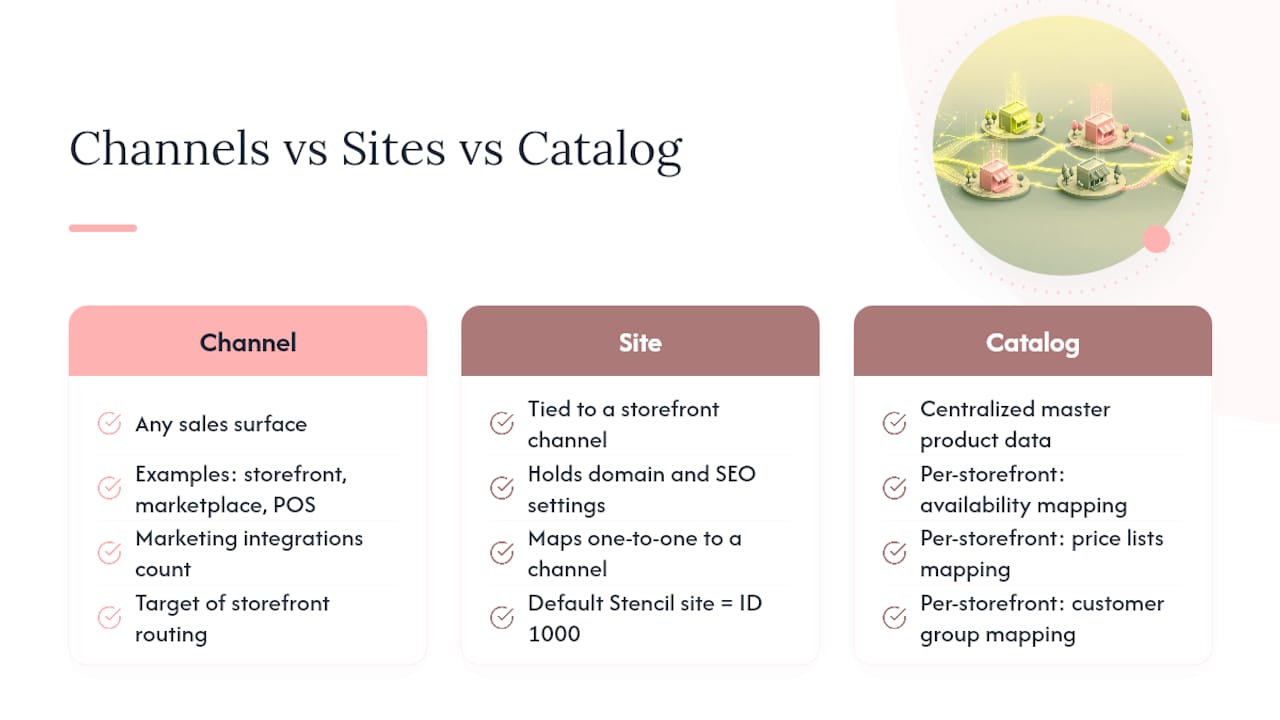
Three terms get conflated constantly, and mixing them up is where MSF rollouts go sideways. A channel is any sales surface, a storefront, a marketplace listing, a POS terminal, or a marketing integration. A site is specifically tied to a storefront channel and holds the settings that apply to that website, like its domain and SEO configuration. According to BigCommerce’s developer documentation, every site maps to exactly one channel, and the default Stencil site carries ID 1000.
That one-to-one relationship matters because it’s where most provisioning mistakes happen. Connect a headless frontend, whether it’s Next.js, Catalyst, or a custom build, to the wrong channel or site pairing, and you get settings mismatches that look like random bugs: wrong currency showing up, promotions leaking across brands, or navigation menus pulling from the wrong storefront. Mis-provisioning that pairing is one of the most common causes of data-sync issues on headless MSF builds.
The catalog itself stays centralized. Every storefront draws from the same master product data, but availability, price lists, and customer group assignments need explicit mapping per storefront. Skip that step and a product built for your wholesale storefront shows up, fully priced, on your consumer site. Localized fields have real limits too. Not every language or region gets full feature parity, and some localization features remain limited by region, including certain tax-inclusive pricing configurations and regional payment methods. Check availability before you promise a market a fully localized launch.
Which Apps Work Across Multiple Storefronts?
Apps split into two categories, and knowing the difference before you install anything saves you weeks of rework. MSF-compatible apps apply their settings globally, once you configure them, every storefront gets the same behavior. MSF-optimized apps let you set configurations per storefront, so your B2B storefront can run different shipping rules than your retail storefront using the same app.
Find out which category an app falls into before you commit:
- Filter the App Marketplace by Multi-Storefront compatibility; compatible apps carry a visible badge
- Confirm pricing scales per storefront, some vendors charge per seat, others bundle
- Test checkout and analytics behavior in a staging storefront before rolling out to production
Pro Tip: Every app installs at the store level by default. If you need storefront-specific settings and the app is only “compatible” rather than “optimized,” you’re stuck with shared configuration whether you want it or not.
For ERP and CRM integrations, or connecting a headless frontend, plan the integration around channel-level API calls rather than assuming one connection serves every storefront. A data platform approach to consolidating order and inventory data across storefronts can save significant engineering time versus stitching together per-storefront exports manually.
How Do You Roll Out a New Storefront Without Breaking Anything?
- Confirm prerequisites. Run the Channel Manager eligibility checklist against your current architecture, API version, and checkout setup before requesting seats.
- Purchase seats and provision. Buy storefront seats through Channel Manager, create the new storefront as inactive first, and set up its channel and site pairing correctly from the start.
- Map the data model. Assign product availability, price lists, customer groups, and payment and shipping methods specific to the new storefront, don’t assume anything inherits automatically.
- Test in the sandbox. Use the inactive storefront to test apps, checkout flow, analytics tracking, and localized content before anyone outside your team sees it. Treat every inactive seat as a staging environment, not dead weight.
- Launch and govern. Activate the storefront, monitor order volume per channel, and document your permission structure upfront. User permissions are set globally, not per storefront, so define roles before launch, not after. Note that deleted storefronts typically carry a 90-day recovery window, plan any teardown accordingly.
When Do You Need an Engineering Partner for Multi-Storefront?
Most MSF rollouts don’t fail on the Channel Manager click-through. They fail on the parts nobody puts in a checklist: a catalog with 40,000 SKUs and inconsistent attribute data, pricing rules that need to reflect three currencies and five customer tiers, or a headless frontend that has to talk to both a legacy ERP and a modern CRM without dropping orders.
That’s the point where bringing in outside engineering capacity pays for itself. Quicktoimpress typically starts complex MSF programs with a discovery phase mapping the existing catalog and integration landscape, then builds a phased roadmap before writing a line of implementation code. Governance and ongoing operations get built into the plan from day one, not bolted on after launch. Enterprise commerce teams and multi-location brands tend to see the biggest returns from this approach, since the data-model and permission decisions made in week one determine how much rework you’re doing in month six.
— Service
Get Your BigCommerce Storefronts Built Right the First Time
Quicktoimpress builds and engineers BigCommerce multi-storefront rollouts for teams that don’t have the internal bandwidth to map catalog architecture, price lists, and customer segments across five or six storefronts while also running the business. Unlike a traditional agency handing you a scoped project and disappearing, the same people who design your channel and site architecture stay on to build it, test it, and fix what breaks post-launch.

If you’re an enterprise commerce team or a multi-location brand weighing an MSF rollout, the technical decisions in the first month, channel provisioning, permission structure, app selection, determine whether the next twelve months run smoothly or turn into a support backlog. Quicktoimpress works alongside your team through discovery, roadmap, and implementation, with governance built in from the start rather than retrofitted later. Visit Quicktoimpress to talk through your storefront architecture and get a roadmap built around your actual catalog complexity, not a generic template.
Sources
- Multi-Site: One Platform, Multiple Brands and Regions | BigCommerce
- Enabling Multi-Storefront | BigCommerce Support
- Introduction to Multi-Storefront | BigCommerce Developer Docs