HubSpot Implementation Guide: A Roadmap for Teams

Successful HubSpot implementation follows a milestone-driven sequence: discovery, account setup, data migration, configuration, training, and monitored go-live, with one accountable owner steering the whole thing. Skip the owner and the milestones drift. SMB teams typically finish in 6 to 8 weeks, while enterprise rollouts with multiple business units or legacy integrations often run 3 to 6 months.
The right next step isn’t buying licenses or watching another demo. It’s a short discovery audit: two hours mapping your current tools, your data sources, and who owns what. That single step determines whether everything downstream goes smoothly or turns into a six-month cleanup project.
Here’s what separates implementations that stick from the ones that get abandoned six months in:
- A named project owner with authority to make configuration decisions, not just relay them
- Two to three prioritized goals for the first phase, not a wish list of twelve
- A realistic timeline with checkpoints, not a vague “we’ll figure it out as we go”
- Data cleaned before migration, not after
Quick fact: Partner-led implementations can cut total timeline by 20 to 40 percent compared to fully DIY projects, mainly because partners catch configuration mistakes before they get baked into daily workflows.
Key Takeaways
A successful HubSpot implementation depends on a single accountable owner, two to three prioritized goals, clean data before migration, and staged rollout milestones tracked from discovery through the first 90 days.
| Point | Details |
|---|---|
| Assign one project owner | Give a single person decision authority over configuration, not a rotating committee. |
| Limit phase one to 2 to 3 goals | Avoid scope creep by prioritizing measurable KPIs before adding stretch features. |
| Clean data before migrating | Deduplicate, normalize formats, and validate emails before any import touches production. |
| Test before you deploy | Run workflows and imports against sample records before they touch live contacts. |
| Consider partner-led delivery | Quicktoimpress pairs strategy with hands-on execution for teams needing integrations, migration, and training handled together. |
Table of Contents
- How to Scope a HubSpot Implementation Plan
- Turning Business Goals Into HubSpot KPIs
- Choosing the Right HubSpot Plan and Setup
- Auditing Your Tech Stack Before You Connect Anything
- Cleaning and Migrating Your Data Into HubSpot
- Designing Properties, Pipelines, and Lifecycle Stages
- Building Workflows and Automation Safely
- Training Teams and Driving Real Adoption
- What to Check Before and After Go-Live
- Keeping Your CRM Healthy as You Scale
- How Long HubSpot Implementation Takes and What It Costs
- How Quick To Impress Approaches HubSpot Implementation
- Why Most HubSpot Implementations Actually Stall
- Get Hands-On Help With Your HubSpot Rollout
- Sources
How to Scope a HubSpot Implementation Plan
Every HubSpot onboarding plan that actually works starts with a discovery workshop, not a login screen. Get your sales, marketing, and service leads in a room (or a call) for 90 minutes and map the actual customer journey: how a lead enters your world, what touches it before a deal closes, and where handoffs currently break down. Write this down. It becomes the blueprint for your pipeline stages and lifecycle definitions later.
Once you know the journey, translate business goals into KPIs you can actually see inside HubSpot. “Grow revenue” isn’t a KPI. “Increase marketing-qualified leads by 15% quarter over quarter” is. So is “cut average deal cycle time from 45 days to 30” or “raise email-to-meeting conversion from 3% to 6%.” These numbers become your dashboards later, so decide them before you build anything.
Here’s a sequence that keeps discovery from sprawling into a permanent planning phase:
- Run the discovery workshop and document the journey map within one week.
- Assign a single project owner with decision authority, not a committee.
- Set 2 to 3 primary goals for phase one, following the same prioritization HubSpot’s own onboarding plans use to avoid scope creep.
- Define governance: who approves new properties, workflows, and integrations after launch.
- Choose phased or all-at-once rollout based on team size and risk tolerance.
Governance matters more than most teams expect going in. Without a gatekeeper, every department starts requesting custom properties and pipelines in week three, and your clean data model turns into forty near-duplicate fields by month two.
Pro Tip: Assign one “property owner” on day one, even before you’ve built anything. Every future request to add a custom field or pipeline stage routes through that person. It’s a five-minute conversation that saves weeks of cleanup later.
On phased versus all-at-once: phased rollouts (marketing first, then sales, then service) reduce disruption because teams learn the platform in digestible chunks, but they stretch total project duration. All-at-once implementations compress the timeline but usually need dedicated partner support to pull off without chaos on launch day. Smaller teams with one clear workflow often do fine going all-at-once. Larger organizations with multiple departments and legacy habits to unwind almost always benefit from staging it.
Turning Business Goals Into HubSpot KPIs
Vague goals produce vague CRMs. If your kickoff meeting produces “improve marketing” as an objective, you’ll end up with a HubSpot instance nobody can measure success against. Every goal needs a number and a timeframe attached before it becomes a build requirement.
Concrete KPIs worth tracking inside HubSpot from day one:
- Marketing qualified leads (MQLs) generated per month, segmented by source
- Lead-to-customer conversion rate across the full funnel
- Average deal cycle length from creation to close-won
- Customer acquisition cost, calculated using HubSpot’s attribution reporting
- Ticket resolution time and customer satisfaction score, if service is in scope
- Revenue attributed to marketing-sourced versus sales-sourced pipeline
Once the KPI list exists, split it into MVP and stretch goals. Your MVP is the minimum configuration that lets the business run and lets you measure the two or three priority goals you set during discovery. Stretch goals are the workflows, custom reports, and integrations that make the platform excellent but aren’t required for a functioning launch.
The simplest way to sort features into MVP versus later is an impact versus effort grid. Draw four quadrants: high impact/low effort goes first, high impact/high effort goes second, low impact/low effort gets scheduled opportunistically, and low impact/high effort gets cut entirely unless someone can defend it with data. A custom lead-scoring model that takes three weeks to build often loses to a basic lifecycle-stage workflow that takes an afternoon and covers 80% of the same use case.
Resist the pressure to launch with everything. HubSpot’s own onboarding guidance prioritizes 2 to 3 goals for a reason: teams that try to solve every problem in phase one usually solve none of them well.
Choosing the Right HubSpot Plan and Setup
Match your HubSpot tier to what your team actually does, not what a sales rep recommends. A five-person sales team running straightforward one-call-close deals rarely needs the same tier as a 200-person enterprise with multiple business units, custom reporting requirements, and dozens of integrations. Buying up front for capabilities you won’t touch for a year wastes budget you’ll need later for training or a partner engagement.
Once the tier is decided, HubSpot’s own setup checklist gives you the exact sequence for the technical foundation:
- Add users and assign permission levels based on role, not convenience
- Install the HubSpot tracking code across your website and any subdomains
- Connect your primary domain and any subdomains you use for landing pages
- Set up lead tracking through forms, landing pages, or API depending on your source mix
- Integrate your existing CRM data source if you’re migrating from another system
- Import your first batch of contacts as a controlled test, not the full database
HubSpot’s official implementation guide treats these six items as the non-negotiable starting point, and skipping any of them tends to surface as a mystery problem two months later, usually a tracking gap or a permissions error nobody can trace back to its source.
Permissions deserve real attention here. Don’t give everyone admin access because it’s faster in week one. Sales reps generally need contact and deal access without the ability to delete properties. Marketing needs workflow and campaign access. Only your project owner and one backup should have full admin rights during the build phase.
Naming conventions matter more than they sound like they should. Decide early whether properties use snake_case or spaced labels, whether pipelines get named by team or by product line, and document it somewhere visible. A CRM with three different naming styles for the same type of data is nearly impossible to report on cleanly six months later.
Auditing Your Tech Stack Before You Connect Anything
Before you touch a single integration setting, build a systems inventory: list every tool that currently touches customer data, from your website’s form builder to your accounting software to that spreadsheet your ops team swears is “temporary.” For each one, note whether HubSpot has a native integration, a supported app in its marketplace, or nothing at all.
Systems with native connectors are the easy wins. The harder decisions come with legacy systems, custom-built internal tools, or anything your IT team built five years ago and nobody fully documented. For those, you’re choosing between three paths: Operations Hub’s data sync tools, third-party middleware, or a custom API build. Operations Hub handles a lot of standard bidirectional syncing without custom code. Middleware tools bridge systems that don’t talk natively. A custom API is the last resort, reserved for genuinely unique data flows that no existing connector handles.
- List every current tool touching customer or deal data, no exceptions
- Flag native HubSpot integrations first, since they require the least engineering time
- Identify systems with no supported connector and decide early whether middleware or a custom build is worth the cost
- Document data ownership: which system is the source of truth for each field type
- Test integrations with a small data sample before connecting production data
Common integration failures share a pattern: two systems both claim ownership of the same field, and updates silently overwrite each other. Another frequent one is a sync that works in testing but breaks under production volume because nobody checked API rate limits. A third: field-type mismatches, where a system exports a date as text and HubSpot can’t parse it, so the field just goes empty with no error message.
Pro Tip: Before connecting any integration to live data, run it against a test HubSpot portal or a sandbox environment with sample records first. Catching a field-mapping error on 20 test contacts costs you ten minutes. Catching it after syncing 40,000 live records costs you a weekend.
Teams managing genuinely complex stacks, multiple business units, or custom-built legacy tools often get more mileage from working with a partner who’s mapped this exact problem before, particularly through growth platform engineering that treats integrations as part of the broader system rather than a bolt-on afterthought.
Cleaning and Migrating Your Data Into HubSpot
Data migration is where implementations quietly go wrong. Not because it’s technically hard, but because teams underestimate how much cleanup their “pretty good” spreadsheet or legacy CRM actually needs. Dirty data doesn’t just look messy. It breaks reporting, triggers workflows on the wrong records, and erodes trust in the whole platform within weeks of launch.
Start with hygiene, before you map a single field:
- Deduplicate contacts and companies using email address and domain as your primary match keys.
- Normalize inconsistent formats: phone numbers, state abbreviations, date formats, and capitalization on company names.
- Validate every contact email against a syntax and domain check, flagging bounced or malformed addresses for review rather than importing them blind.
- Remove or archive records that haven’t had activity in years, since importing dead data just inflates your contact tier and clutters reporting.
- Confirm required fields are populated for any record that feeds a workflow trigger, or that workflow will silently skip records missing the data.
Dirty data at migration time is one of the most common causes of broken reporting and duplicate records six months into a new HubSpot instance, and cleanup after the fact takes far longer than cleanup before.
Mapping comes next, and this is where the standard-versus-custom-property decision matters. Use HubSpot’s standard properties (email, phone, company name, lifecycle stage) whenever a standard property already covers the field. Reserve custom properties for genuinely unique data your business tracks that HubSpot doesn’t model out of the box, things like a specific certification date, a proprietary risk score, or an internal account tier. Every unnecessary custom property you create is one more thing your team has to maintain, document, and eventually explain to a new hire.

Before touching production data, run a test import. Pull 50 to 100 representative records, covering your messiest edge cases on purpose (missing fields, special characters, duplicate-looking entries), and import them into a sandbox or a clearly-flagged test segment. Check that properties mapped correctly, that lifecycle stages landed where expected, and that no workflow fired unexpectedly on the test batch. Only after that validation passes should you schedule the full import.
Have a rollback plan documented before you migrate anything at scale: know how you’d identify and remove a bad import batch, and keep your original data source untouched and readable until you’ve confirmed the migration succeeded.
For migrations involving tens of thousands of records or multiple linked object types, a phased import sequence matters. Migrate contacts first, validate reporting looks right, then companies, then deals, then engagement history. Trying to import everything simultaneously multiplies the number of things that can go wrong at once, and it makes troubleshooting a mapping error significantly harder because you can’t isolate which object type caused it. Preserving unique ID fields from your source system throughout this process gives you a reliable way to catch duplicates later, even after the original export file is long gone.
Teams handling migrations with genuine complexity, multiple source systems, years of accumulated data debt, often benefit from a documented external framework. Practical CRM data migration planning guidance covers rollback strategies and phased approaches in more depth if your dataset falls into that category.
Designing Properties, Pipelines, and Lifecycle Stages
Your CRM architecture should mirror how your team actually sells and serves customers, not a generic template pulled from a HubSpot tutorial. Before creating a single custom property, ask whether an existing standard property already covers it. When you do need something custom, name it clearly and consistently: deal_source_detail beats Source2 every time someone tries to build a report six months from now.
Pipeline design lives or dies on exit and entry criteria. Every stage needs a clear, specific rule for what moves a deal into it and what moves it out. “Qualified Lead” isn’t a stage definition. “Contact has confirmed budget authority and a timeline within 90 days” is something a rep can actually apply consistently. Vague stage criteria produce a pipeline where every rep interprets “qualified” differently, and your conversion reporting becomes meaningless.
- Define entry and exit criteria for every pipeline stage before building it, not after reps start using it
- Keep lifecycle stages (subscriber, lead, MQL, SQL, opportunity, customer) aligned to actual marketing-to-sales handoff points
- Build a basic lead-scoring model using firmographic fit plus engagement signals before attempting anything more sophisticated
- Limit custom properties to data HubSpot’s standard fields genuinely don’t cover
- Create at least one dashboard per department tracking the KPIs defined during discovery
Lifecycle stages deserve particular care because they’re the connective tissue between marketing and sales. If marketing calls something an MQL and sales doesn’t agree on what qualifies as one, you’ll get finger-pointing about lead quality within the first month. Get both teams to agree on lifecycle definitions during discovery, not after launch, and write the criteria down somewhere both teams can reference.
Pro Tip: Build your adoption dashboard before you build your revenue dashboard. Tracking who’s actually logging activities and updating deal stages in the first 30 days tells you whether your revenue numbers are even trustworthy yet.
Reporting should map directly back to the KPIs you set during discovery. If “reduce deal cycle time” was a phase-one goal, build a dashboard tile that shows it explicitly, not buried three clicks deep in a generic sales report nobody checks. Teams managing multiple pipelines across departments or business units often need a dedicated revenue operations layer to keep dashboards consistent as the CRM architecture grows.
Building Workflows and Automation Safely
Automation is where HubSpot implementations start paying off, and also where a poorly tested workflow can quietly damage your data or annoy your entire contact list in one bad send. Start with the automation patterns that solve real, common problems rather than trying to automate everything at once.
- Lead routing: Build a workflow that assigns new leads to the right rep or team based on territory, deal size, or product interest, triggered the moment a form submits or a deal enters a specific stage.
- Nurture sequences: Set up email sequences triggered by lifecycle stage changes, spacing sends out realistically rather than overwhelming a new lead with five emails in three days.
- Ticket automation: If service is in scope, automate ticket assignment based on issue type or urgency, and trigger internal notifications for anything flagged high-priority.
Test every workflow on a small set of test records before it touches live contacts. Create three or four dummy records that represent your edge cases, run the workflow manually against them, and confirm the outcome matches what you expected at every branch. A workflow that looks correct in the builder can still behave unexpectedly once real, messy data flows through its conditions.
Change control matters as much for workflows as it does for code. Require a second set of eyes before any workflow goes live that touches contact status, deal stage, or sends external communication. Document who approved it and when. Build in a rollback trigger, a documented process for pausing or reverting a workflow the moment something looks off, rather than scrambling to figure out how while contacts are actively receiving the wrong email. Teams that skip this step tend to discover their mistake only after a client replies asking why they got the same email four times.
Training Teams and Driving Real Adoption
A CRM nobody uses is a very expensive spreadsheet. Training has to be role-specific, because a sales rep and a marketing manager need almost nothing in common from their onboarding session.
- Sales: Deal creation, pipeline movement, logging calls and emails, and using the mobile app for updates between meetings
- Marketing: Building forms and landing pages, setting up basic workflows, and reading campaign attribution reports
- Service: Ticket creation, the knowledge base tool, and SLA tracking if your plan includes it
- Admins: Property management, permission settings, and workflow governance rules established during setup
Role-based training sessions paired with team-specific playbooks consistently outperform generic all-hands training, mostly because reps and marketers stop tuning out content that doesn’t apply to their day.
Adoption doesn’t happen because people attended a training session once. It happens because someone keeps it alive. Name a champion on each team, someone slightly more comfortable with HubSpot than their peers, who fields quick questions before they become support tickets. Run optional weekly office hours for the first month. Build one adoption dashboard that shows login frequency and activity logging by rep, and review it in team meetings, not to punish anyone but to catch the people quietly reverting to their old spreadsheet.

Pro Tip: Tie one small, visible incentive to early adoption, something as simple as recognition in a team meeting for the rep with the cleanest pipeline data in month one. Behavior changes faster when it’s noticed, not just measured.
Practical onboarding timing and touchpoint templates offer a useful structural model if you’re designing your internal training cadence from scratch and want a proven rhythm to adapt.
What to Check Before and After Go-Live
Pre-launch QA is where rushed implementations get caught, or don’t. Pull a sample of migrated records across every object type and manually check that properties mapped correctly, lifecycle stages are accurate, and no workflow fires unexpectedly on real data. Confirm every user has correct permissions and that the tracking code fires on every domain and subdomain in production.
- Sample-check at least 20 to 30 migrated records per object type against the original source data.
- Confirm tracking code, domain connections, and lead capture forms all function on production URLs, not just staging.
- Announce the cutover date to every affected team at least a week ahead, with a clear point of contact for issues.
- Freeze non-critical changes to the old system for 48 hours around cutover to avoid data drifting between two live systems.
- Assign specific owners to check reporting accuracy, workflow behavior, and user login activity daily for the first week.
The first 90 days matter more than launch day itself. At 30 days, check adoption metrics and fix the workflows people are complaining about. At 60 days, review reporting accuracy against your original KPIs. At 90 days, decide what phase two looks like, based on what actually broke or got requested, not what you guessed in advance.
Keeping Your CRM Healthy as You Scale
HubSpot instances degrade the same way junk drawers do: slowly, through a hundred small additions nobody thought to clean up. Property sprawl and workflow sprawl are the two most common signs a CRM needs a governance reset, usually showing up as duplicate-sounding fields, workflows nobody remembers the purpose of, and reports that no longer match what leadership actually wants to see.
- Run a quarterly audit of properties and archive anything unused for six months or more
- Review active workflows for overlap, redundancy, or outdated logic tied to processes that no longer exist
- Watch for scale triggers: a new team onboarding, a jump in data volume, or a new marketing channel needing its own attribution model
- Revisit lifecycle stage definitions annually, since sales and marketing processes shift faster than most teams update their CRM to match
- Decide whether ongoing support should be retainer-based (continuous small improvements) or project-based (defined scope, defined end date) depending on how often your needs change
A growing multi-location brand or a scaling SaaS company usually outgrows its original HubSpot configuration within a year or two, not because the initial build was wrong, but because the business changed. That’s the point where ongoing revenue operations support, rather than another one-off project, tends to make more sense.
How Long HubSpot Implementation Takes and What It Costs
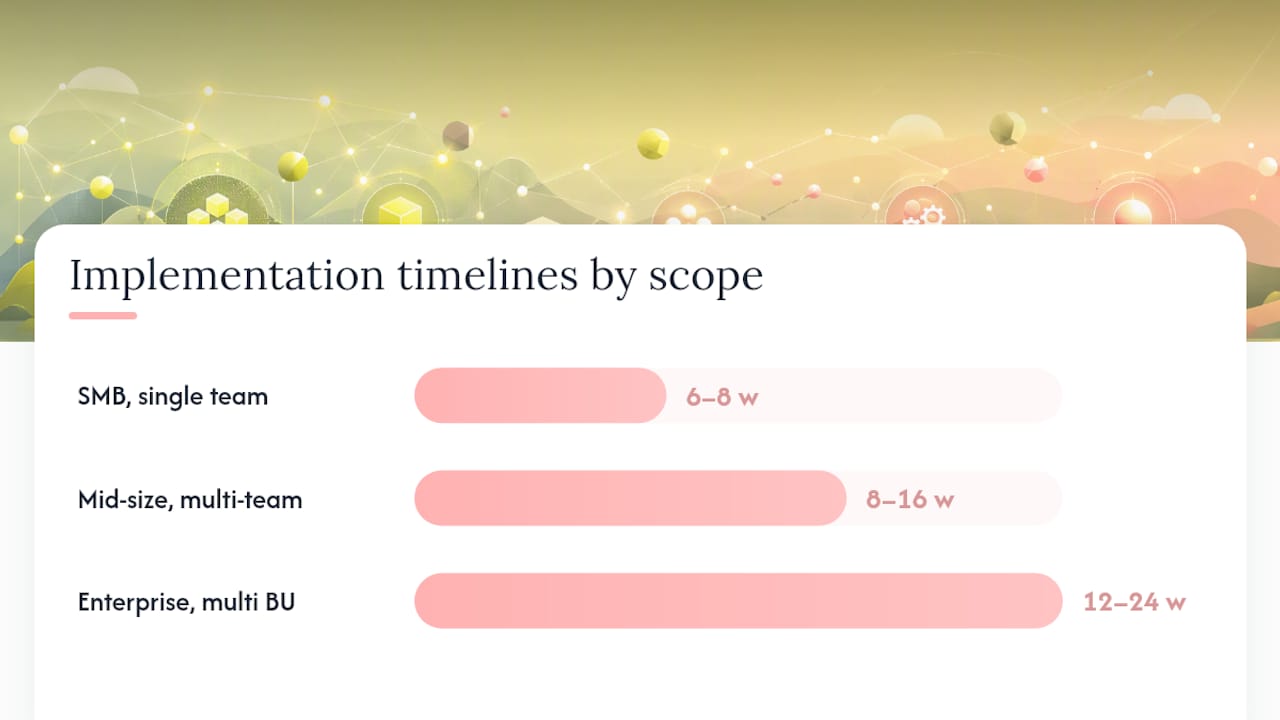
Timeline and cost both scale with complexity, not company size alone. A five-person SMB with clean data and no legacy integrations can realistically launch in 6 to 8 weeks. An enterprise with multiple business units, custom reporting demands, and several legacy systems to integrate often needs 3 to 6 months to do it properly.
| Scope | Typical Timeline | What Drives the Range |
|---|---|---|
| SMB, single team, minimal integrations | 6 to 8 weeks | Data volume, number of custom workflows needed |
| Mid-size, multiple departments | 8 to 16 weeks | Cross-team governance, pipeline complexity |
| Enterprise, multiple business units | 3 to 6 months | Legacy system integrations, custom reporting, data migration scale |
Quick fact: Partner-led implementations can shorten total timeline by roughly 20 to 40 percent compared to a fully internal build, largely because a partner has already solved the integration and governance problems your team is encountering for the first time.
DIY implementations cost less upfront in dollars but more in internal hours, and they carry higher risk of the exact mistakes covered earlier: dirty data, sprawling properties, workflows nobody tested. Partner-led engagements cost more directly but compress timeline and reduce the odds of a costly redo. The deciding factor is almost always complexity: the more integrations, custom reporting, and legacy data you’re carrying, the more a partner’s experience pays for itself in avoided rework.
How Quick To Impress Approaches HubSpot Implementation
Quicktoimpress pairs senior strategy with the people who actually build the system, so the person who designed your pipeline architecture is the same person configuring it, not a handoff between a strategist and an anonymous implementation team.
- Revenue operations architecture spanning HubSpot, Salesforce, Pardot, and ActiveCampaign for teams juggling more than one platform
- Integration and middleware engineering for legacy systems without native HubSpot connectors
- Migration planning and execution for complex, multi-object datasets
- Role-based training and adoption programs built around your specific sales and service motions
A HubSpot implementation succeeds when the strategy and the build stay connected the entire way through, not when a roadmap gets handed off to a different team to execute weeks later.
Capabilities across revenue operations and growth platform engineering extend to the full technical stack surrounding a CRM rollout, not just the CRM configuration itself, which matters most for organizations juggling commerce platforms, marketing automation, and internal tools simultaneously.
Why Most HubSpot Implementations Actually Stall
The conventional advice on HubSpot implementation obsesses over features: which workflows to build, which reports to configure, which integrations to prioritize. That’s not where most implementations actually fail. They fail on governance—the unglamorous work of deciding who owns what and enforcing it.
Teams love to skip the discovery workshop because it feels slow compared to just logging in and building something. That instinct is backwards. The projects that stall at month four almost always skipped clear stage definitions or let five people create custom properties without anyone checking for duplicates first.
Here’s the uncomfortable truth: HubSpot’s technical learning curve is genuinely manageable. Most teams can figure out how to build a workflow. What they can’t self-teach is discipline, the willingness to say no to a stretch goal in phase one, to enforce a naming convention when someone wants to skip it for speed, to actually run the test import instead of trusting the full migration will “probably be fine.”
Prioritize the boring stuff first: one owner, two or three goals, clean data before migration. The exciting automation work is genuinely more fun to build. It’s also the part that survives just fine if you build it in month two instead of week one.
Get Hands-On Help With Your HubSpot Rollout
If you’ve read this far, you already know the technical setup isn’t the hard part. Coordinating discovery, migration, configuration, training, and governance across multiple teams, on a deadline, while running your actual business, is what turns a straightforward checklist into a stalled project. Quicktoimpress exists for exactly that gap: a partner who stays hands-on through the build instead of handing you a roadmap and disappearing.

Quicktoimpress works directly with marketing, revenue, and technology teams on HubSpot implementations that need real engineering behind them, not just configuration help. That includes revenue operations architecture, integrations with existing platforms like Salesforce or ActiveCampaign, complex data migrations, and the training programs that make adoption actually stick after launch. For multi-location brands and B2B SaaS teams juggling more moving parts than a single admin can manage alone, that hands-on layer tends to be the difference between a six-week launch and a six-month scramble.
If your team is scoping a HubSpot rollout and wants a partner involved from discovery through go-live, see how Quicktoimpress works and get a sense of what an engagement looks like for your specific scope.