5 Ready to Copy Pardot Engagement Studio Templates for B2B Marketers

Pardot Engagement Studio (part of Salesforce Account Engagement) is the visual workflow builder that moves prospects through a multi-step nurture based on their behavior, not just a calendar date. It’s built for B2B marketers who need automated sequences that branch, wait, and sync with Salesforce CRM. Use it when a program needs logic and patience; skip it for one-off blasts that a simple list email handles just fine.
TL;DR:
- Engagement Studio should be used for programs requiring complex branching, timing, and behavior-based logic, such as onboarding, pre-sales, or renewal sequences.
- Building programs with fewer, well-placed steps is more effective than creating overly complex flows with dozens of branches, which are harder to test and debug.
- Trigger windows should be set slightly longer than expected response times to prevent prospects from entering unintended branches due to delays.
- Common templates like welcome campaigns, pre-sales nurturing, and customer re-engagement perform best when aligned with meaningful buyer relationship shifts.
- Integrating Engagement Studio with Salesforce CRM for lead routing and automating follow-up actions significantly boosts revenue-generation capabilities.
Table of Contents
- Where Engagement Studio Fits in Account Engagement
- Core Step Types and Program Logic
- Five Engagement Studio Templates You Can Adapt Today
- Best Practices: Personalization, Segmentation, and Timing
- Testing, QA, and Your Launch Checklist
- Reporting and Optimization: Turning Data Into Program Changes
- Advanced Techniques: CRM Sync, Lead Routing, and Scaling
- When It Makes Sense to Bring in a Growth Engineering Partner
- Quicktoimpress Builds the Revenue Operations Behind Your Programs
- Sources
Where Engagement Studio Fits in Account Engagement
Pardot marketing automation gives you several ways to reach prospects, and picking the wrong one wastes both your time and the platform’s capabilities. Autoresponders send a single message after a trigger. Automation rules run continuously in the background, checking conditions and applying actions across your whole database. Engagement Studio sits above both: it’s the only tool built for sequencing, where a prospect moves through a defined path over days or weeks, branching based on what they actually do.
Choose Engagement Studio when you need more than one touchpoint tied together with decision logic. A single “thanks for downloading” email doesn’t need a program. A six week onboarding sequence that changes based on whether someone logs into your product does.
The programs that get built most often in Account Engagement fall into a short list of patterns, and Salesforce Ben’s rundown of common program templates covers the ones that show up across nearly every B2B org:
- Welcome campaigns that greet new leads and set expectations for what they’ll hear from you next
- Pre-sales nurturing that scores and warms leads before a sales rep ever picks up the phone
- Customer onboarding that paces product education after a deal closes
- Renewal reminders that fire on a timeline ahead of contract expiration
- Sunset programs that re-engage cold prospects once, then quietly suppress them
These aren’t arbitrary categories. According to Trailhead’s Engagement Studio best practices module, programs built around welcome, onboarding, pre-sales, renewal, and sunset moments consistently perform because they map to a real shift in the prospect’s relationship with your company.
The mistake worth avoiding: overbuilding. A program with 40 steps and a dozen branches is harder to test, harder to debug, and usually solves a problem that three well-placed rules would have solved faster. If you find yourself adding a branch just because you can, that’s the moment to step back and ask what the program actually needs to accomplish.
Core Step Types and Program Logic
Every Engagement Studio program is built from five step types, and understanding how they interact is the difference between a program that works and one that quietly breaks in week three.
Actions do something. Send an email, add a tag, change a field value, notify a sales rep. They’re the workhorses of any program and they execute immediately once a prospect reaches that step.
Triggers listen for an event inside a defined window. A trigger might watch for “clicked link in email” or “visited pricing page” for, say, three days after the prospect enters that step. If the event happens, they branch one way; if the window closes without it, they branch another.
Rules check the state of prospect data at that exact moment, rather than waiting for an event. A rule might ask “does this prospect have a score above 50?” and evaluate it once, on arrival, with no waiting window at all.
Waits pause the prospect for a set duration, a specific date, or until a particular day of the week arrives.
End steps simply exit the prospect from the program, sometimes with a final action attached.
According to Trailhead’s module on actions, triggers, and rules, the practical rule of thumb is this: use triggers when you’re branching on behavior, and use rules when you’re branching on data that’s already sitting in the prospect’s record. Mixing them up is the single most common logic error in program design.
Here’s a quick reference for deciding which step to reach for:
- Need to send something or change a value? Use an action.
- Need to branch based on what the prospect does next? Use a trigger, and set a window that matches realistic response time (24 to 72 hours works for most email opens).
- Need to branch based on data already in the record, like lead score or industry? Use a rule.
- Need to space out communication or land a send on a specific day? Use a wait.
- Need to exit the prospect cleanly, possibly with a tag or notification? Use an end step.
One precedence issue trips up a lot of builders: when a landing page trigger and a form completion trigger could both fire from the same click, Pardot evaluates based on the actual event sequence, not the order steps appear in your canvas. If a prospect fills out a form embedded on a landing page, the form completion typically registers before or independently of the page view trigger, and builders who assume the visual order controls execution order end up with prospects skipping branches they were supposed to hit.
Pro Tip: Set trigger windows slightly longer than you think you need. A 24-hour window feels tight for someone checking email once a day, and a prospect who opens on the second day gets pushed into the “didn’t respond” branch even though they were only running late.
Five Engagement Studio Templates You Can Adapt Today
You don’t need to design a program from a blank canvas. These five templates cover the programs most B2B teams build first, and each one maps to a specific business goal.
Welcome campaign. Entry list: new leads from a form fill or list import. Sequence: an immediate welcome email, a two-day wait, a second email highlighting a resource or case study, another wait, then a third email inviting a next action like a demo request. Goal metric: email engagement rate, since the point here is building the habit of opening your mail.
Pre-sales nurturing. Entry list: leads who’ve hit a minimum score threshold but haven’t converted to an opportunity. Sequence: content-driven emails branched by triggers on link clicks, with a rule step checking lead score at intervals. When score crosses a set threshold, an action step notifies the assigned rep and routes the lead into Salesforce. This is where Engagement Studio earns its keep as a revenue tool rather than just an email scheduler.
Customer onboarding. Entry list: closed-won opportunities synced from Salesforce. Sequence: timed check-ins spaced across the first 30, 60, and 90 days, each pairing an educational asset with a trigger checking product login activity. No login after a wait period branches into a lighter-touch re-engagement email instead of piling on more content.
Renewal reminders. Entry list: accounts approaching contract end date, usually pulled via a Salesforce field sync. Sequence: staged reminders at 90, 60, and 30 days out, with an action step notifying the account owner at each stage so no renewal conversation happens by surprise.
Sunset program. Entry list: prospects with no engagement in 90-plus days. Sequence: one re-engagement email offering something specific, a short wait, then a rule checking for any click or open. No response routes straight to an end step with a suppression tag applied, keeping your active database clean.
Trailhead’s best practices module points out that programs built around these five moments perform reliably because each one aligns with a genuine shift in the buyer’s relationship with your company, not an arbitrary marketing calendar date.
Best Practices: Personalization, Segmentation, and Timing
Engagement Studio programs that convert well share three habits: they personalize past the merge tag, they segment before entry rather than mid-program, and they respect the clock.
Dynamic content driven by actual prospect field values (industry, product interest, deal stage) outperforms a first-name variable tag by a wide margin, according to Trailhead’s guidance on ethical personalization practices. Map fields intentionally: if you’re capturing industry or company size on your forms, build content blocks that swap based on those values rather than sending one generic version to everyone.
Segmentation should happen at the entry list level whenever possible, not three steps into the program. Build separate entry criteria for cold leads versus warm ones instead of funneling everyone into the same program and hoping a rule step sorts them out later.
A few operational habits worth locking in:
- Segment prospects by time zone before entry, not after, so a 9 a.m. send actually lands at 9 a.m. local time rather than the middle of the night
- Set program business hours so automated sends respect weekends and holidays rather than firing on a Saturday
- Test every send at least once with a real inbox before the program goes live, checking rendering and links
- Build suppression lists into the entry criteria so customers or unsubscribed prospects never accidentally enter a prospecting sequence
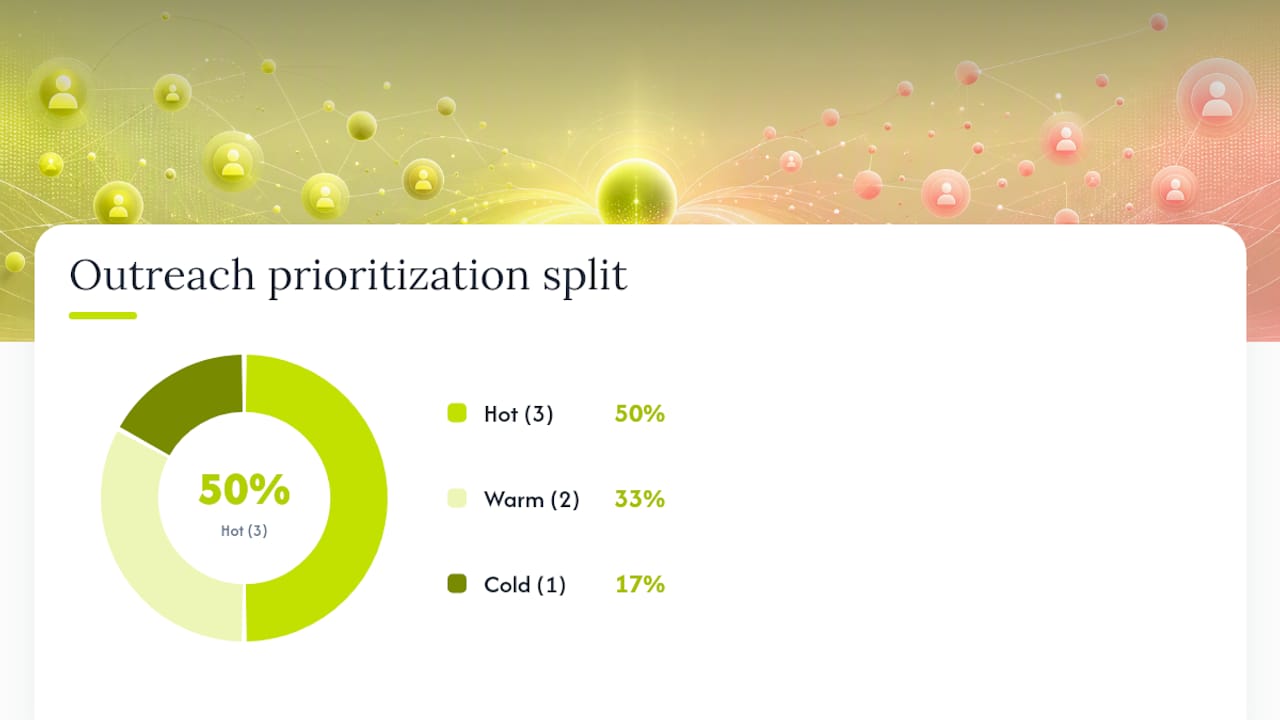
On cadence, the 3-2-1 pattern is worth building into your prioritization logic: route your three hottest, sales-ready prospects for immediate outreach, your two warm ones into a shorter nurture, and your one cold lead into a longer, lower-touch sequence. This pattern, outlined in Trailhead’s Engagement Studio best practices, keeps sales reps focused on the leads worth their time instead of splitting effort evenly across a mixed-quality list.
Pro Tip: If you’re running programs across North America, Europe, and Asia Pacific, build separate entry rules by region rather than one global program with a single send time. A universal 8 a.m. send is morning for nobody but the region you built it around.
Testing, QA, and Your Launch Checklist
Never launch a program without walking it end to end first. Engagement Studio’s interactive test feature lets you simulate a prospect moving through every branch, and the Test Log shows you a timeline of exactly what fired and when, according to Salesforce’s guidance on creating engagement programs. Run through it before you touch the “activate” toggle.
- Confirm every email asset exists and is approved. A program that references a draft email will stall silently at that step.
- Run the interactive test and step through each branch, not just the happy path. Force trigger conditions to both fire and time out so you see both outcomes.
- Check the Test Log timeline for any step that shows an unexpected delay or skip. A mismatch between what you expected and what the log shows usually points to a trigger window set too short or a rule checking the wrong field.
- Verify suppression and entry lists are current, especially if you built them weeks before launch. A stale list can accidentally exclude prospects who should qualify.
- Confirm scheduled sends respect business hours you’ve set, particularly for any step with a hardcoded day-of-week wait.
The Salesforce Help documentation on Engagement Studio is explicit that recipient lists, suppression lists, and every asset in the program logic need to be finalized before you start the program, not patched in afterward. Debugging a live program is far harder than catching the same error in test mode.
Reporting and Optimization: Turning Data Into Program Changes
Step-level reporting is where Engagement Studio separates itself from a basic autoresponder. Hover over any step and a report card surfaces conversion numbers, engagement rates, and dropout counts specific to that point in the journey, a feature detailed in Trailhead’s module on creating engagement programs.
Three metrics matter more than the rest:
- Conversion to goal tells you whether the program is doing its actual job, whatever that goal is set to (demo request, form fill, opportunity creation)
- Step-level dropout shows you exactly where prospects stall or exit, which is far more useful than a program-wide open rate
- Time-in-step flags waits that are too long or too short relative to how prospects actually behave
When a step underperforms, don’t rebuild the whole program. Run small, isolated experiments instead: adjust one trigger window by 24 hours and watch whether conversion shifts, test two subject lines on the same email without touching anything else, or swap the content in one branch while leaving the rest untouched. Isolating variables this way tells you what actually moved the number, instead of guessing.
Pro Tip: Revisit step-level reports every 30 days for your highest-volume programs. A step that performed well at launch can quietly degrade as your audience mix shifts.
Advanced Techniques: CRM Sync, Lead Routing, and Scaling
Engagement Studio earns its place as a revenue engine, not just an email scheduler, when it’s wired into Salesforce CRM for lead routing and rep notifications at the moment a prospect hits a qualifying step. Assigning ownership and firing a Salesforce task automatically, rather than relying on a rep to check a report, is what separates a program that generates pipeline from one that just generates opens.
When scaling to multiple concurrent programs, build long wait buffers before end steps so you can extend the logic later without orphaning prospects mid-sequence. Watch for program inactivity too: a program with no prospects moving through it for roughly 30 days can go dormant, so keep steady list entry or build a loop that re-evaluates stragglers periodically.
Pro Tip: Segment by time zone at program entry, not mid-program. Retrofitting time zone logic into a live sequence is far messier than building it in from step one.
When It Makes Sense to Bring in a Growth Engineering Partner
Some teams build their first Engagement Studio program solo and it goes fine. Others hit a wall the moment they need Salesforce field mapping, multi-region timing logic, or a program that has to survive a CRM migration. That’s usually the signal to bring in outside help rather than losing another sprint to trial and error.
Quicktoimpress works with B2B SaaS teams and revenue operations groups on exactly this kind of Salesforce and Pardot integration work, building programs that hold up as the underlying growth platform scales.
Quicktoimpress Builds the Revenue Operations Behind Your Programs
Marketing teams often build a solid welcome sequence, then stall the moment a program needs to talk to Salesforce, route leads by territory, or survive a CRM data migration without breaking. Quicktoimpress closes that gap: our revenue operations engineers implement and debug Pardot programs alongside the CRM integrations, lead routing rules, and reporting systems they depend on, so the automation doesn’t fall apart the first time your data model changes.

That means fewer silent failures, faster time from build to launch, and programs that produce measurable pipeline instead of just open rates. Multi-touch approaches also compound well here. Layering Engagement Studio with broader multi-channel funnel strategies gives prospects more than one path back to your sales team, rather than relying on email alone.
If your team is scaling Account Engagement across multiple product lines, regions, or a growing Salesforce instance, see how Quicktoimpress approaches revenue operations and get a straight answer on what it would take to get your next program live without the guesswork.
Sources
- Create an Engagement Studio Program (Salesforce Help)
- Engagement Studio best practices (Trailhead)
- 5 Pardot Engagement Studio Examples – and How to Build Them (Salesforce Ben)