5 Metrics That Prove Salesforce Lead Lifecycle for Admins & RevOps

The Salesforce lead lifecycle tracks a lead from first capture through conversion, disqualification, or nurture, and the one action that determines whether it works is enforcing shared MQL and SQL definitions before you touch a single field mapping. Get the criteria right first. Then conversion, which builds an Account and Contact from lead data, will actually route revenue where you can measure it.
TL;DR:
- Successful lead lifecycle management depends on agreeing on clear, documented qualification criteria for each stage, especially MQL and SQL, before automation begins.
- Proper alignment between lead status and lifecycle stages prevents data inconsistencies and ensures accurate reporting of pipeline progress.
- Converting leads without properly mapping custom fields and source attribution risks losing valuable data and impairing marketing attribution.
- Setting SLA-driven acceptance windows by lead source and score tier, along with automated escalation, improves response times and lead engagement.
- Maintaining trustworthy data through duplicate detection, validation rules, and enrichment is essential for accurate lifecycle stage transitions and performance metrics.
Table of Contents
- Understanding the Salesforce Lead Lifecycle Stages
- Lead Status vs. Lifecycle Stage: What Conversion Actually Does
- Building Handoffs That Don’t Leak Leads
- Keeping Your Lifecycle Data Clean and Auditable
- The Metrics That Actually Tell You the Lifecycle Is Working
- What Quicktoimpress Sees in Lifecycle Implementations That Work
- Where the Salesforce Lead Lifecycle Usually Breaks Down
- Customizing the Lifecycle for Different Business Models
- Connecting the Lifecycle to Campaigns and Marketing Automation
- Why Data Quality Determines Whether the Lifecycle Means Anything
- Automation Examples: Process Builder and Einstein Lead Scoring in Practice
- The Real Judgment Call Admins Face
- Sources
Understanding the Salesforce Lead Lifecycle Stages
Most orgs fail at lifecycle management not because they lack automation, but because marketing and sales never agreed on what “qualified” means. A lead scored 90 in marketing’s mind and a lead worth a phone call in sales’ mind are frequently two different records, and that gap is where pipeline data goes to die.
The canonical stages, drawn from how practitioners typically structure a Salesforce lead lifecycle, run in a fairly consistent sequence:
- New: captured but unworked, from a form, import, or manual entry.
- MQL (Marketing Qualified Lead): meets a scoring threshold or behavioral trigger, such as downloading a pricing sheet or attending a webinar tied to a target persona.
- SAL (Sales Accepted Lead): a sales rep or SDR has reviewed the MQL and formally accepted ownership, usually inside an SLA window.
- SQL (Sales Qualified Lead): budget, authority, need, and timeline have been confirmed through direct conversation, not inferred from behavior.
- Converted / Disqualified / Nurture: the three terminal outcomes. Converted moves to Account/Contact/Opportunity. Disqualified closes the loop with a reason code. Nurture holds leads that are real but not ready, feeding them back into marketing sequences.
Advancement between stages should never rely purely on a score. Automation can flag a lead as MQL when it crosses a scoring threshold, but SAL requires a human decision, usually an SDR clicking “accept” inside a queue or a Flow-driven acceptance record. That human checkpoint is what prevents marketing from unilaterally declaring victory on a lead sales never wanted.
Document every threshold as org-level standards, not tribal knowledge. Create a picklist field for Lifecycle Stage separate from Lead Status (more on that distinction below), and write the qualification criteria into a Salesforce Knowledge article or a pinned Chatter post on the Lead object itself, so a new SDR isn’t guessing what “MQL” means on their third day.
Pro Tip: Store your MQL/SQL threshold values in a Custom Metadata Type instead of hardcoding them in Flow. When marketing wants to change the scoring cutoff from 80 to 90, you edit one record instead of rebuilding automation.
Lead Status vs. Lifecycle Stage: What Conversion Actually Does
Lead Status and lifecycle stage get conflated constantly, and that confusion breaks reports. Lead Status is the standard Salesforce picklist field on the Lead object (values like “Open,” “Working,” “Qualified,” “Unqualified”). Lifecycle stage is the conceptual framework, MQL, SAL, SQL, that you likely track with a custom field because the standard object doesn’t natively model it.
Keep them aligned with three rules:
- Map picklist values to lifecycle stages explicitly. “Working - Contacted” should correspond to a documented lifecycle stage, not a rep’s personal interpretation.
- Understand what Convert does before you click it. Conversion generates an Account from the Company field, a Contact from the lead’s name, and optionally an Opportunity, and lets you map custom lead fields to the corresponding target object fields so nothing gets dropped in the handoff.
- Watch for person accounts. If your org has person accounts enabled, a lead with no company name converts differently, creating a person account rather than a standard Account/Contact pair. Test this in a sandbox before it surprises you in production.
The “Don’t create opportunity” checkbox matters more than most admins treat it. If your sales process requires a formal Opportunity for every converted lead, leaving that box unchecked by default protects your pipeline reporting from silent gaps. And always preserve source attribution, campaign, first-touch channel, UTM parameters, during conversion, since losing that data at the point of conversion breaks funnel attribution for everyone downstream in marketing.
Building Handoffs That Don’t Leak Leads
Speed kills or saves deals depending on which side of the response window you’re on. A lead that sits unaccepted for six hours has already cooled off; one accepted in six minutes is still warm enough to convert.
Set SLA acceptance windows by lead source and score tier, not a single blanket number. For example, a high-intent demo request might warrant a very short SLA, while a content download sits fine at a longer SLA. Measure compliance with a report filtering Created Date against the first Lead Status change, then flag anything that blew the window.
Routing patterns worth building:
- Round-robin for evenly distributing volume across a flat SDR team.
- Territory-based assignment when geography or account size determines ownership.
- Skills-based routing for reps specializing by industry vertical or product line.
- Queues as a safety net, holding leads that fail primary assignment rules until a human intervenes.
Build escalation into the automation itself. If a lead sits unaccepted past the SLA, a Flow should automatically reassign it or alert a manager, never rely on someone noticing a stale dashboard. Assignment Rules handle the basic routing logic, but Flow gives you the conditional branching and time-based escalation that Assignment Rules alone can’t. Einstein-powered routing adds predictive scoring to the assignment decision itself, useful once your SDR team has grown past the size where manual round-robin tuning still works, though most teams should nail basic SLA discipline first, since automated acceptance windows tend to outperform manual gating on both speed and consistency.
Pro Tip: Add a “Time Since Last Status Change” formula field to every lead list view your SDRs use. It turns an abstract SLA policy into a visible, sortable number they can act on without opening a report.
Keeping Your Lifecycle Data Clean and Auditable
A lifecycle built on dirty data measures nothing. Duplicate leads inflate your MQL count, broken validation lets incomplete records slip into conversion, and untracked field changes make it impossible to prove what happened when a deal goes sideways.
Four patterns keep this in check:
- Wire scoring thresholds directly into stage transitions. When a lead’s score crosses your documented MQL cutoff, a Flow should update the lifecycle stage field automatically rather than waiting for a batch job or manual review.
- Run duplicate detection at the point of capture, using Salesforce’s native duplicate rules or a third-party matching tool, and define a clear merge hierarchy (most recent activity wins, or highest lead score wins) so reps aren’t merging records arbitrarily.
- Enforce validation rules before conversion is even possible. Require Company, Last Name, and a valid Email format before the Convert button becomes usable, catching bad data before it becomes a permanent Account record.
- Preserve pre-convert state. Use field history tracking or a custom object snapshot to capture what the lead record looked like at the moment of conversion, so audits and attribution reports don’t rely on memory.
The Metrics That Actually Tell You the Lifecycle Is Working
Five numbers matter more than any dashboard vanity metric: time-in-stage per lifecycle stage, new lead response time, MQL to SQL conversion rate, lead-to-opportunity conversion rate, and a disqualification reason breakdown.
Build these as separate reports filtered by lead source, campaign, owner, and territory, so a slow SLA on one channel doesn’t get buried inside an org-wide average. Prebuilt dashboards and visual pipeline tools give you a starting template, but the filter breakdown is what actually surfaces where leads are stalling.
- Time-in-stage flags where leads get stuck, often revealing a bottleneck at SAL, not SQL.
- Response time should be measured from Created Date to first status change, not first activity logged.
- Disqualification reason codes tell you whether marketing is sourcing badly or sales is rejecting too aggressively.
Make sure every report’s stage filter maps exactly to your documented lifecycle definitions. If “MQL” in your report pulls from lead score while your Flow advances stage from a different field, you’ll double count leads that technically qualify twice.
What Quicktoimpress Sees in Lifecycle Implementations That Work
Most broken lifecycles trace back to the same root cause: definitions were never written down, so every automation rule encodes someone’s personal interpretation of “qualified.” Quicktoimpress builds revenue operations architecture across HubSpot, Salesforce, and Pardot specifically to close that gap.
Three steps, in order: align definitions across marketing and sales before writing a single Flow, automate routing and SLAs second, then instrument reporting last, once the upstream stages are trustworthy. Skipping straight to dashboards on a lifecycle nobody agrees on just produces confident, wrong numbers.
Where the Salesforce Lead Lifecycle Usually Breaks Down
Score inflation is the most common failure. Marketing tunes lead scoring to hit an MQL quota, sales stops trusting the “MQL” label, and reps quietly start ignoring the flag entirely, working leads off gut feel instead. The fix isn’t better scoring logic. It’s a quarterly review where marketing and sales jointly audit a sample of MQLs against actual close rates.
Silent conversion data loss ranks second. Admins add custom fields to the Lead object, forget to map them during conversion setup, and months later discover that a critical qualification field has been blank on every Contact and Opportunity since launch. Audit your lead-to-object field mappings any time you add a custom field to the Lead layout, not just at initial setup.
Orphaned leads in queues cause the third major leak. A queue exists as a routing safety net, but if nobody owns clearing it, leads accumulate for weeks. Assign a queue owner explicitly and put queue age on a dashboard someone actually checks.
Stage definition drift happens gradually. The lifecycle stage documentation from eighteen months ago no longer matches what the Flow logic actually does, because three different admins made “quick fixes” without updating the source document. Treat lifecycle documentation as a living artifact tied to a change log, not a one-time project deliverable.
Finally, over-automating the human judgment calls. SAL acceptance and SQL qualification both require a rep’s read on intent and fit that no scoring model fully captures. Automate the routing and the SLA enforcement; keep the qualification decision itself in human hands.
Customizing the Lifecycle for Different Business Models
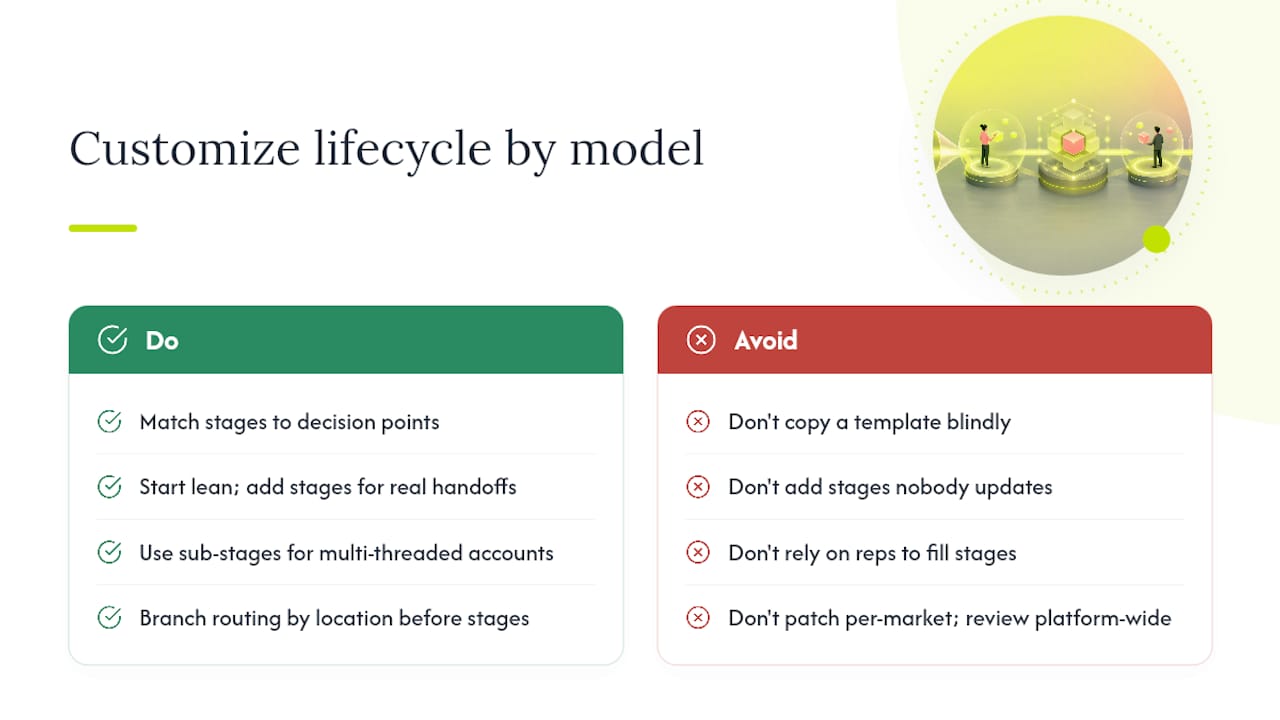
A five-stage lifecycle built for enterprise SaaS with a six-month sales cycle will strangle a transactional e-commerce business that closes in a single session. Customization starts with matching stage count to actual decision points, not copying a template.
High-velocity, low-touch businesses often collapse MQL and SAL into a single automated stage, since there’s no SDR layer reviewing every lead before a rep engages. The lifecycle might run New, Qualified, Converted, with scoring and routing happening almost instantly through Flow.
Complex B2B sales motions, particularly in SaaS with multiple stakeholders, usually need the full five-stage model plus a sub-stage for multi-threaded accounts, where a single Opportunity involves several converted leads from the same company. Multi-location or franchise businesses face a different problem entirely: the lifecycle logic stays constant, but routing must branch by location or territory before any lifecycle stage evaluation happens, since a lead in one city has no business landing with a rep three states away.
Whatever the model, resist adding stages nobody will consistently update. A seven-stage lifecycle where reps only ever populate three fields isn’t more sophisticated, it’s more broken. Start lean, add a stage only when you can point to a specific decision or handoff it represents, and revisit the structure annually against actual usage data pulled from field history. Companies scaling across multiple markets or brands typically need this reviewed as part of a broader multi-location platform strategy rather than patched stage by stage.
Connecting the Lifecycle to Campaigns and Marketing Automation
The lead lifecycle doesn’t operate in isolation from your campaign structure. Every lead that enters through a form, event, or ad should carry a Campaign association from the moment of capture, because that link is what eventually lets you report ROI back to a specific channel once the lead becomes an Opportunity.
If you run Account Engagement (Pardot) alongside Salesforce, know that Pardot maintains its own lifecycle stage vocabulary, Visitor, Prospect, MQL, SQL, and Won, which syncs to but isn’t identical to your Salesforce-side lead status. The Lifecycle Stage API lets you query these records directly, which matters when you’re reconciling marketing’s view of a lead’s journey against sales’ view inside the CRM.
Multi-touch attribution reporting depends entirely on Campaign Member records surviving the conversion process intact. If a lead touched four campaigns before converting, all four associations need to carry through to the resulting Contact, or your attribution model collapses to last-touch by accident. Test this specifically in a sandbox before assuming your integration handles it correctly, since it’s one of the more common silent failures in marketing-to-sales handoff.
Why Data Quality Determines Whether the Lifecycle Means Anything
A lifecycle stage is only as trustworthy as the data feeding the transition logic. Bad company data, mismatched domains, missing firmographic fields, means your scoring model is guessing rather than measuring, and no amount of Flow sophistication fixes garbage inputs.
Lead enrichment, whether through a native Salesforce data provider or a connected third-party service, fills in firmographic gaps (company size, industry, revenue band) that raw form submissions almost never include. That enrichment should happen as close to lead capture as possible, ideally before the first scoring evaluation runs, so a lead never gets mis-scored on incomplete information and then has to wait for a re-score cycle to catch up.
Standardizing input fields matters just as much as enrichment. If your form allows free-text entry for “Company,” you’ll end up with “IBM,” “I.B.M.,” and “International Business Machines” as three separate values feeding three separate duplicate records. Picklists, autocomplete fields, or a validation layer at capture prevent this before it ever reaches the database.
Automation Examples: Process Builder and Einstein Lead Scoring in Practice
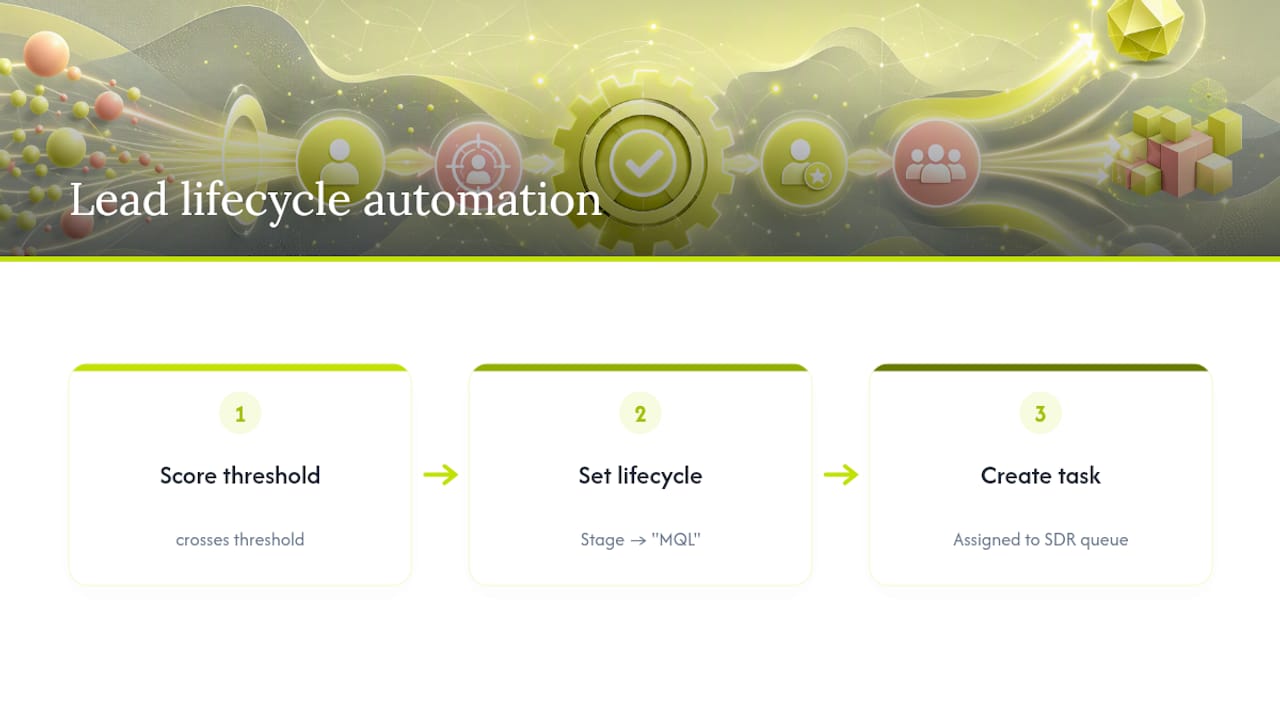
Process Builder is retired in favor of Flow for new automation, but plenty of orgs still run legacy Process Builder logic handling lifecycle transitions, and it’s worth understanding the pattern even as you migrate. A typical setup fires when Lead Score crosses a threshold, updates the Lifecycle Stage field to “MQL,” and creates a task assigned to the appropriate SDR queue, all in one automated sequence.
Einstein Lead Scoring builds a predictive model from your org’s historical conversion data, assigning each new lead a score based on which attributes correlated with past wins rather than a static point system someone configured manually years ago. Where a manual scoring model might award fixed points for “downloaded pricing PDF,” Einstein weighs that same behavior differently depending on what actually preceded closed-won deals in your specific pipeline history.
The practical pattern: use Einstein’s score as an input to the same Flow-driven stage transition logic you’d build for manual scoring, rather than treating it as a separate parallel system. That keeps your lifecycle stage field as the single source of truth regardless of which scoring engine feeds it, which matters enormously if you ever swap scoring providers or add a second model for a different product line.
The Real Judgment Call Admins Face
Most lifecycle failures Quicktoimpress sees aren’t automation failures. They’re definition failures wearing automation as a disguise. Teams build increasingly elaborate Flow logic to compensate for the fact that marketing and sales never actually agreed on what “qualified” means, and no amount of scoring sophistication fixes a disagreement at the source.
The conventional advice, “add more automation, add more fields, build a better dashboard,” treats symptoms. Conversion mechanics and SLA design matter, but they only work once the underlying definitions are shared and written down somewhere neither department can quietly redefine on their own.
Prioritize this: get marketing and sales in a room to jointly define MQL and SQL criteria before building a single new automation rule. Document it somewhere durable. Only then build the routing, the scoring, and the reporting on top. Teams managing this across multiple product lines or business units often benefit from an outside revenue operations partner precisely because internal politics make that definitional alignment harder to force through without a neutral facilitator holding the process accountable.
— Service
Sources
- Create and convert leads (Trailhead - Salesforce)
- What’s a Lead Lifecycle in Salesforce? A Guide for Admins & Ops — LeanData