Server-Side Tagging: What It Is and How to Set It Up

Server-side tagging routes browser events through a server container you control before they reach analytics and ad platforms, instead of letting dozens of vendor scripts run in the visitor’s browser. That single change cuts client-side load, gives you a checkpoint to filter data before it leaves your infrastructure, and improves measurement accuracy. Teams typically adopt it once they’re scaling analytics, tightening consent controls, or losing data to ad blockers.
TL;DR:
- Server-side tagging reduces client workload by consolidating multiple vendor requests into a single server request, improving page load times.
- It offers enhanced data security and privacy control by filtering PII and managing consent before data reaches third-party platforms.
- Setting up requires provisioning a server container, configuring custom subdomains, and implementing transformations to ensure data quality and compliance.
- Monitoring involves preview modes, logging inbound payloads, and validating event structure to prevent duplicate or malformed data.
- Full deployment demands scaling, cost management, and integration with consent systems, with professional support recommended for ongoing operation and compliance.
Table of Contents
- What Is Server-Side Tagging?
- Architecture and Components You Need to Provision
- Why Use Server-Side Tagging: Benefits and Trade-Offs
- How to Set Up Server-Side Tagging: Implementation Steps
- How to Send Data to the Server Container
- Operational Considerations: Scaling, Cost, and Security
- Debugging and Validating Your Server-Side Setup
- Consent and Privacy Best Practices
- Rollout Checklist Before Full Cutover
- Quicktoimpress’s Perspective on Server-Side Tagging
- Get Server-Side Tagging Built and Operated for You
- Where to Go Next for Implementation Details
- Sources
What Is Server-Side Tagging?
Server-side tagging (often shortened to SST, or called server side GTM) moves tag execution off the browser and onto a server you host. Instead of a page firing ten separate vendor requests, the browser sends one event to your server container, which then decides what to do with it.
The setup uses two containers. A web container in the visitor’s browser captures interactions like page views, clicks, and purchases, then forwards them as a single HTTP request. The server container receives that request, processes it, and dispatches it to Google Analytics, ad platforms, or your own data warehouse.
Inside that server container, clients convert incoming HTTP requests into structured events, tags send data onward to destinations, and transformations modify or enrich the data in between. That vocabulary matters because it’s how you’ll configure everything downstream.
Architecture and Components You Need to Provision
A working setup rests on a few concrete pieces. You need a place to host the server container, the container itself configured with clients and tags, and a domain that routes traffic to it.
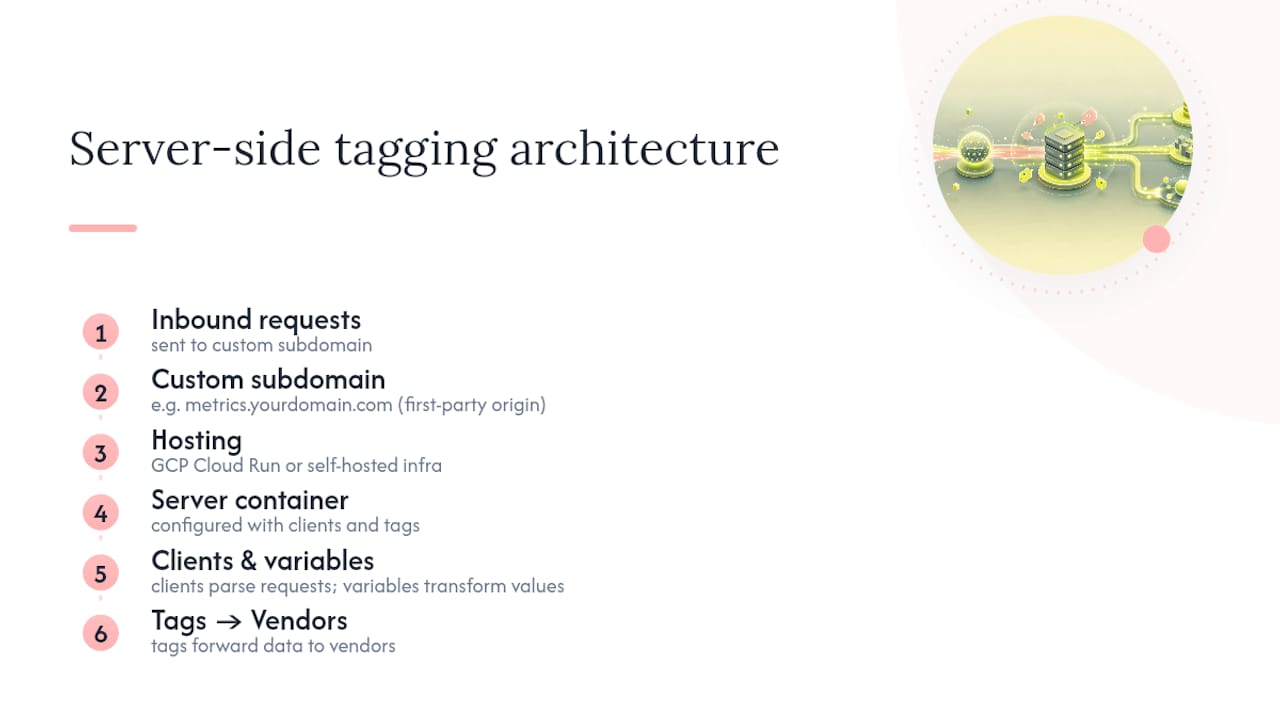
For hosting, Google Tag Manager’s server-side product offers automatic provisioning on Google Cloud Platform through Cloud Run, or manual setup on your own infrastructure if you need custom networking or compliance controls. Automatic provisioning is the faster path for most teams and the one Google recommends for testing.
Inside the container, clients (including a preinstalled Google Analytics client) parse inbound requests, tags forward data to vendors, and variables and transformations reshape values before they leave. Mapping a custom subdomain, something like metrics.yourdomain.com, matters more than it sounds. It lets the tagging server act as a first-party origin, which extends cookie lifespan and sidesteps a chunk of third-party blocking that would otherwise strip your data.

Why Use Server-Side Tagging: Benefits and Trade-Offs
The performance case is straightforward: the browser sends one HTTP request instead of firing a dozen vendor scripts, which cuts the code your visitors’ browsers have to execute and speeds up page load, especially on mobile.
The privacy case is arguably bigger. Because every event passes through your server before it reaches a third party, you get a single checkpoint to strip personally identifiable information, apply consent rules, and decide exactly what leaves your infrastructure. Google frames this as a way to harden data security and enable first-party serving strategies rather than trusting dozens of scripts running unsupervised in the browser.
Data quality improves too, since you can normalize fields and deduplicate events centrally instead of hoping every vendor pixel fires correctly. The trade-off is that you now own a piece of cloud infrastructure. Someone has to monitor uptime, manage scaling, and budget for hosting costs that didn’t exist before.
How to Set Up Server-Side Tagging: Implementation Steps
Getting from zero to a working pilot follows a predictable sequence, whether you’re building on Cloud Run or your own servers.
- Create the GTM server container in your Tag Manager account and choose a provisioning method. Automatic GCP Cloud Run setup is the quickest route for a pilot; manual hosting suits teams with existing infrastructure or specific compliance requirements.
- Provision the tagging server. For testing, Cloud Run’s default instance is enough. For anything customer-facing, plan to scale beyond a single instance from the start.
- Map a custom subdomain to the server container so it operates as a first-party origin, then configure clients (to parse inbound requests) and tags (to forward data to Google Analytics, ad platforms, or a warehouse).
- Set transformations and activation criteria so each client only processes the event types it should, and data gets normalized before it’s sent onward.
- Instrument your web pages using gtag.js, a tracking pixel, or a fetch call, then send test events and confirm they arrive intact on the server side before touching production traffic.
How to Send Data to the Server Container
Most implementations start with gtag.js, which sends events to your server endpoint using whichever transport the browser supports. Google’s documentation lists image pixel requests, the fetch API, XHR, and service worker iframe techniques as fallback options, which matters when a visitor’s browser or network blocks one method but not another.
For mobile apps and server-to-server integrations, where there’s no browser to run gtag.js at all, the Measurement Protocol is the standard path. It has narrower parameter support than the web SDKs, so map your event schema carefully before you rely on it for anything beyond basic hits.
Either transport lets you attach extra event-level and configuration parameters, but do that deliberately: every additional field is something your server-side transformations need to validate, and something a downstream vendor might reject if the format doesn’t match what it expects.
Operational Considerations: Scaling, Cost, and Security
A single Cloud Run instance is fine for testing, but running production traffic on one instance is a common early mistake. Set a minimum instance count and autoscaling rules so a traffic spike doesn’t drop events.
Cost mostly comes down to three levers: network egress, instance size, and request volume. Teams commonly see incremental costs of several dozen dollars per server per month after moving past the free tier, and that number climbs fast if traffic spikes without routing controls in place.
Security-wise, strip PII at the server before it reaches any tag, tokenize identifiers where you can, enforce content security policies, and only forward data to authenticated vendor endpoints.
Pro Tip: Build your transformations to be idempotent and reversible. Normalize fields, strip PII, and tag each event with a provenance marker as it passes through, so when something breaks six months from now, you can trace exactly which step changed the data.
Debugging and Validating Your Server-Side Setup
GTM’s preview mode is your first stop. It shows which clients activated for a given request and how the event structure looks once it’s parsed, which catches most configuration errors before they hit production.
Beyond preview, log inbound HTTP payloads and map them against your event variables directly. Watch specifically for duplicate events and missing user or session IDs. Those two issues account for most of the “why don’t my numbers match” tickets teams file in the first month. Once the pipeline looks clean on your end, confirm receipts on the vendor side too. A parameter that looks correct in your server logs can still arrive malformed at Google Analytics or an ad platform if the mapping is off.
Consent and Privacy Best Practices
Server-side tagging doesn’t replace a consent management platform. It works alongside one. Pair your server container with a consent manager and pass consent signals through mechanisms like Google Consent Mode so tags respect user choices before any data leaves your server.
At the transformation layer, filter or pseudonymize PII before forwarding events, and only send the attributes each destination actually needs. Keep a lightweight log of consent status alongside each processed event. It won’t fix a compliance gap on its own, but it gives your team something concrete to point to during an audit instead of reconstructing behavior after the fact.
Rollout Checklist Before Full Cutover
- Run a pilot on a subset of traffic and compare the resulting data against your existing client-side numbers for parity.
- Map and test the custom domain, confirm cookie behavior holds up, then scale server instances for full load.
- Put monitoring, alerting, and a runbook in place before you cut over completely.
Quicktoimpress’s Perspective on Server-Side Tagging
Server-side tagging is infrastructure, not a plugin. That distinction gets lost when teams treat it as a Tag Manager checkbox instead of a system with uptime requirements, cost curves, and consent logic that need to stay in sync with legal and product teams. That distinction gets lost when teams treat it as a Tag Manager checkbox instead of a system with uptime requirements, cost curves, and consent logic that needs to stay in sync with legal and product teams. Quicktoimpress embeds directly with marketing and engineering teams to build that system, not just configure the container. We typically recommend server-side tagging for multi-location brands and enterprise commerce organizations juggling fragmented consent requirements and attribution that breaks across properties.
— Service
Get Server-Side Tagging Built and Operated for You
Most teams don’t need another how-to guide. They need someone to build the container, map the domain, and keep it running once traffic hits it for real. Quicktoimpress is a growth engineering partner that embeds with your team to design, deploy, and operate server-side tagging as part of a larger revenue and analytics system, not a one-off project that goes stale after launch.

That includes handling the subdomain mapping and first-party serving strategy that a technical consultancy would normally scope separately, plus the ongoing monitoring and cost tuning most teams underestimate when they first provision Cloud Run.
| Service | Outcome |
|---|---|
| Server container setup and custom domain mapping | First-party data collection with longer cookie lifespans |
| Consent and PII transformation logic | Compliant, audit-ready event pipelines |
| Scaling and monitoring configuration | Stable uptime without single-instance outages |
| Integration with revenue and attribution systems | Cleaner, more reliable measurement for ROI reporting |
If your team is weighing a pilot or already stuck mid-migration, talk to Quicktoimpress about scoping the build.
Where to Go Next for Implementation Details
Start with Google’s server-side tagging documentation for tag templates, then review the send-data guide for transport specifics.
Sources
- An introduction to server-side tagging | Google Tag Manager
- Client-side tagging vs. server-side tagging - Tag Manager Help