What Shopify B2B Features Actually Cover for Wholesale Sellers

Shopify’s native B2B features now cover company accounts, tiered catalogs, flexible payment terms, draft orders, and Shopify Flow automations without a single third-party app. The trade-off: a few high-value pieces, like deposits and unlimited catalogs, still sit behind Shopify Plus.
- Best for: brands running self-serve wholesale who want reorders and quoting without building a custom portal.
- Main limits: catalog counts are capped on Basic, Grow, and Advanced plans, and deposits remain Plus-only.
- Next step: map your catalog and payment-term needs before you pick a plan or start building integrations like Shopify Flow or B2B APIs.
Key Takeaways
Shopify’s native B2B features handle company accounts, catalogs, payment terms, and draft orders on every plan, but deposits and unlimited catalogs require Plus.
| Point | Details |
|---|---|
| Catalogs drive pricing structure | Assign catalogs by company location or Market, and check your plan’s active catalog cap before promising custom pricing broadly. |
| Payment flexibility is broad but capped | Net terms, vaulted cards, and manual payments work on every plan; deposits and partial payments need Shopify Plus. |
| Draft orders double as quotes | Sales reps can adjust pricing and send draft orders for buyer approval before checkout completes. |
| Integration sequencing matters most | Sync ERP or CRM pricing and inventory data before customizing the storefront to avoid brittle, retrofitted fixes. |
| Address behavior needs a workaround | One-time shipping addresses aren’t saved by default, so recurring multi-site buyers may need a custom portal solution. |
Table of Contents
- How Shopify Structures Companies and Company Locations
- Customer-Specific Catalogs, Volume Pricing, and Quantity Rules
- Payment Terms, Deposits, and Draft Orders for Wholesale Checkout
- Self-Serve Buying: Reorders, Bulk Ordering, and Buyer Roles
- Customizing Your Storefront for B2B Buyers
- Automating B2B Workflows With Shopify Flow and APIs
- When You Actually Need Shopify Plus
- A Practical Rollout Checklist for Scaling Merchants
- Where Quicktoimpress Fits in a B2B Shopify Rollout
- The Feature List Isn’t Your Real Decision
- Where to Verify These Shopify B2B Details
- Sources
How Shopify Structures Companies and Company Locations
Shopify treats a wholesale buyer as a “company,” and each company can have multiple “company locations,” which is how Shopify handles a retailer with several warehouses or storefronts. Each location gets its own pricing, catalog assignment, and payment terms, and you assign staff roles like location admin or ordering-only buyer to control who can check out versus who can just browse.
Getting a buyer into the system happens two ways: an account request form on your storefront, or a direct invitation email you send from the admin. If you already have D2C customers who buy in bulk, you can convert their existing accounts into a company profile without losing order history.
- Location admins manage users and payment methods; ordering-only roles just place orders.
- Account request forms capture tax IDs and business details upfront.
- Sales reps can log in as an admin to place orders on behalf of a buyer.
Customer-Specific Catalogs, Volume Pricing, and Quantity Rules
Catalogs are the backbone of Shopify B2B pricing. You build a curated product list, attach a price list to it, and assign that catalog either to specific company locations or across an entire Market. That structure covers most wholesale scenarios, from single-region distributors to buyers with negotiated contract pricing.

Inside a catalog, quantity rules and volume pricing let you set minimum order quantities, order increments (sell only in cases of 12, for example), and maximums. Volume pricing then applies automatic discounts as order size increases, so a buyer ordering 500 units pays less per unit than one ordering 50, with no manual quote required.
The plan you’re on decides how far this scales. Shopify extended these B2B features to Basic, Grow, and Advanced merchants at no added cost, but those plans cap the number of active catalogs you can run at once. Shopify Plus removes that cap entirely, which matters the moment you’re managing contract pricing for dozens of distinct accounts rather than a handful.
- Assign catalogs by company location for account-specific pricing.
- Use quantity rules to enforce case-pack minimums and increments.
- Check your plan’s active catalog limit before promising custom pricing to every new wholesale account.
Payment Terms, Deposits, and Draft Orders for Wholesale Checkout
Wholesale buyers rarely pay at checkout the way a retail customer does, and Shopify’s B2B checkout is built around that reality.
- Payment terms. You can offer Net 7, 30, 60, or 90 days, or require payment due on receipt or on fulfillment, all configured per company location.
- Deposits and partial payments. Available, but this is one of the features Shopify reserves for Plus merchants, so a buyer putting 30% down on a large order needs a Plus store to do it natively.
- Vaulted cards and alternative payments. Shopify supports saved cards, ACH, PayPal, and manual payment methods like check or wire, which matters for buyers who don’t want to enter a card every order.
- Draft orders as quotes. A sales rep can build a draft order, adjust pricing or add a discount, and send it to the buyer for approval before it converts to a real order, effectively functioning as a built-in quoting tool.
Self-Serve Buying: Reorders, Bulk Ordering, and Buyer Roles
Once a company account is live, the buying experience is where Shopify B2B either saves you labor or doesn’t. Buyers get full order history and one-click reordering, so a repeat purchase doesn’t require rebuilding a cart from scratch every time.
Bulk ordering works through a quick-order form where buyers enter SKUs and quantities directly, which beats clicking through product pages one at a time for a 40-line order. Some merchants extend this further with CSV upload tools built via apps or custom portals for very high line-count orders.
- Buyer roles determine who can check out versus who can only build draft carts for approval.
- Company location settings can force orders to submit as drafts rather than completing instantly.
- Order history is scoped per company location, not just per user.
Customizing Your Storefront for B2B Buyers
Shopify Markets lets you show different currencies, tax rules, and even content blocks to B2B buyers versus your regular retail traffic, all from one storefront rather than a separate site.
For merchants who want a dedicated look and feel for wholesale, Shopify’s Trade theme is built specifically for B2B storefronts, and merchants needing full control can go headless using Shopify’s storefront APIs. Gating matters here too: most stores hide wholesale pricing entirely until a buyer logs into an approved company account, which keeps retail customers from seeing contract rates.
- Use Markets to segment currency, tax, and content by buyer region.
- Consider the Trade theme before building a custom storefront from scratch.
- Gate pricing behind login rather than hiding entire product pages, which hurts SEO discoverability.
Pro Tip: If wholesale catalog pages are public but pricing is gated, work with a partner like Babylovegrowth’s Shopify SEO service to make sure those pages still rank for buyer search terms even though prices stay hidden.
Automating B2B Workflows With Shopify Flow and APIs
Shopify Flow can automate the repetitive parts of B2B account management: tagging new company orders by size, sending automatic invoice reminders, and triggering onboarding emails the moment a company account gets approved. None of that requires custom development.
Where Flow stops, integrations pick up. Direct connectors work for simple syncing, an iPaaS platform handles moderate complexity across multiple systems, and a custom API integration is the right call once your pricing or inventory logic gets genuinely complicated.
Merchants commonly integrate Shopify with ERPs or CRMs to keep pricing and inventory accurate across systems, and custom API work is the recommended path once business logic gets complex.
- Start with Flow templates for tagging, invoicing, and onboarding before building anything custom.
- Reserve iPaaS or custom APIs for multi-warehouse or multi-currency pricing logic.
- Enterprise merchants often prioritize ERP sync first, because stale pricing data breaks buyer trust faster than a missing feature does.
When You Actually Need Shopify Plus
The gap between Shopify’s standard plans and Plus comes down to a short list of features, but they’re the ones that matter most as you scale. Basic, Grow, and Advanced merchants get companies, catalogs, quantity rules, and draft orders. Plus adds unlimited catalogs and, critically, deposits and partial payments.
- If you’re managing more than a handful of custom-priced accounts, check your plan’s catalog cap first.
- If large orders need a deposit before production or shipping, only Plus supports that natively.
- If you need advanced checkout customization or complex API-driven storefronts, Plus gives you more room to build.
Weigh the Plus subscription cost against what a missing deposit workflow or catalog cap actually costs you in manual work.
A Practical Rollout Checklist for Scaling Merchants
Get the integration right before you touch the storefront. Pricing and inventory accuracy across your ERP or CRM matters more to buyers than any theme customization, and fixing sync issues after launch is far more expensive than planning for them first.
Three pitfalls trip up most merchants. One-time shipping addresses aren’t saved to a company location by default, which frustrates buyers who ship to job sites or rotating branches. Permission structures get complicated fast once you have multiple buyer roles per location. And catalog segmentation needs are almost always underestimated until the third or fourth contract-pricing request comes in.
- Audit your current wholesale catalog and pricing tiers before mapping them into Shopify.
- Trace your payment terms and deposit requirements against what your plan actually supports.
- Prototype the draft-order approval flow with a real sales rep before rolling it out broadly.
- Pick your integration approach (Flow, connector, or custom API) based on how complex your pricing logic really is, not how complex it feels right now.
Pro Tip: Build a metafield structure for contract terms, rebate percentages, and branch preferences before your ERP integration goes live. Retrofitting that data model after buyers are already ordering is far more painful than setting it up first.
Where Quicktoimpress Fits in a B2B Shopify Rollout
Most of what breaks in a Shopify B2B rollout isn’t a missing feature. It’s sequencing. Merchants build the storefront first, discover their pricing data lives in three disconnected systems, and end up retrofitting an integration under deadline pressure.
Quicktoimpress works with multi-location brands and enterprise commerce teams on exactly this problem: syncing ERP and CRM data before the storefront goes live, not after. If you’re weighing Shopify Plus against a custom integration path, or you need revenue operations work to keep payment terms and invoicing in sync across systems, that’s a conversation worth having before you commit to a plan tier. Explore Quicktoimpress’s growth platform engineering or see the full range of capabilities for scaling commerce teams.
The Feature List Isn’t Your Real Decision
The conventional advice on this topic treats Shopify’s B2B feature list like a checklist: does it have catalogs, does it have payment terms, check the boxes and move on. That framing misses the actual decision, which is architectural, not feature based.
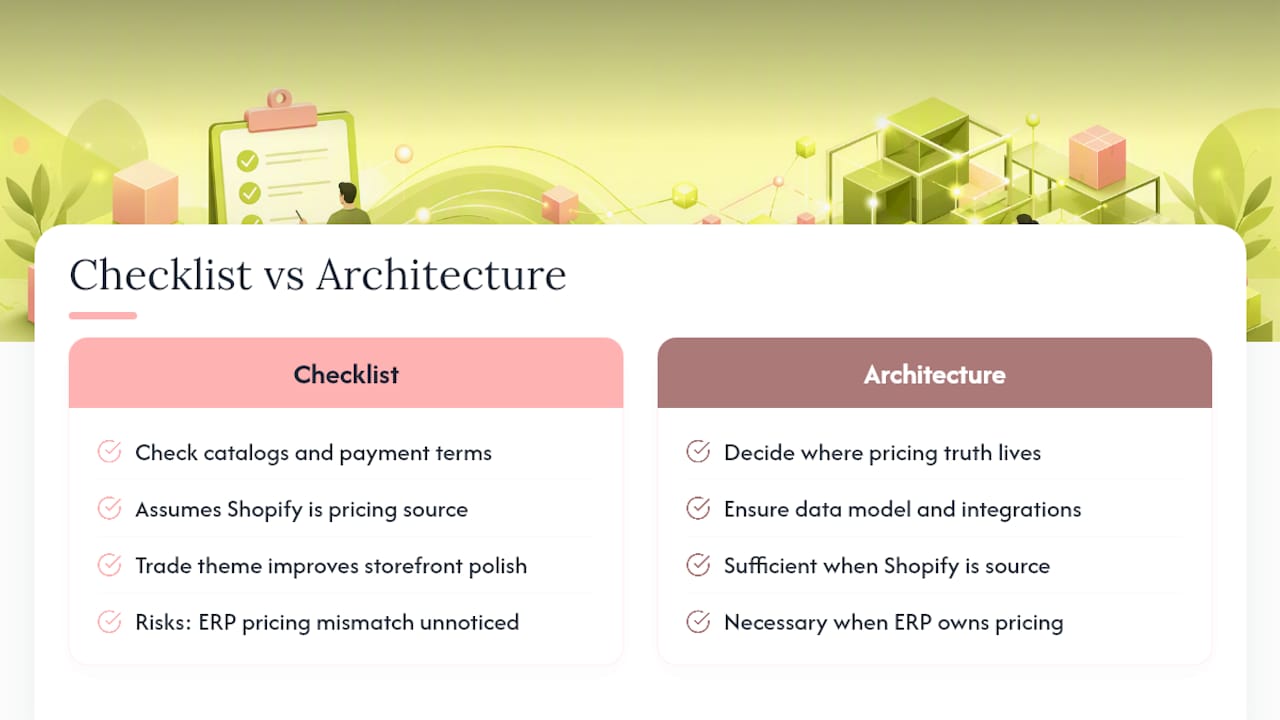
Every merchant I’d point to Shopify B2B for has the same underlying question: where does pricing truth live? If it’s genuinely just Shopify, native catalogs and quantity rules will carry you a long way, even on a standard plan. If pricing truth lives in an ERP, the storefront features become almost secondary. You’re really deciding how to keep two systems from lying to each other.
The overrated feature, in my read, is the Trade theme. It looks impressive in a demo, but most B2B buyers care far more about accurate contract pricing showing up correctly than they do about storefront polish. Get the data model right first. The theme is the easy part.
— Service
Where to Verify These Shopify B2B Details
Shopify’s own documentation stays the most reliable reference as B2B features roll out to more plans.
- Overview of B2B features on Shopify covers catalogs, quantity rules, and company profiles in detail.
- Checkout and payment methods for Shopify B2B documents payment terms, vaulted cards, and draft orders.
- Shopify brings native B2B features to millions more merchants explains which features are plan-exclusive versus universally available.
- Integrating external systems with Shopify B2B outlines connector, iPaaS, and custom API approaches for ERP and CRM sync.
Sources
- Shopify brings native B2B features to millions more merchants
- Overview of B2B features on Shopify
- Checkout and payment methods for Shopify B2B
- Integrating external systems with Shopify B2B