Avoid Quarterly Storefront Breaks: Shopify Hydrogen for Developers

Hydrogen is Shopify’s developer toolkit for building headless storefronts, and it works best when you want commerce-optimized primitives (carts, variants, Shop Pay) without building that logic from scratch. Pick it when Oxygen’s edge hosting and quarterly Storefront API alignment fit your team’s operating model. Skip it if you need full framework independence or run infrastructure that competes directly with Oxygen’s constraints.
TL;DR:
- Hydrogen’s core server logic is tied to Shopify’s quarterly Storefront API updates, requiring explicit version pinning and CI validation to prevent silent breakages.
- The framework is more suited for Shopify-native commerce builds and may hit Oxygen’s runtime limits if workloads involve heavy server-side processing or long-running tasks.
- Deployment options include Oxygen’s managed edge hosting or self-hosting, with the latter suitable only for workloads approaching Oxygen’s constraints or requiring custom infrastructure.
- Setting up a Hydrogen storefront involves quick scaffolding, linking to a store, configuring environment variables, testing locally, and deploying through CI/CD pipelines to catch issues early.
- Integrations with third-party systems such as CRMs or analytics can be embedded into server handlers for real-time data sync, but environment management must be carefully maintained across all deployment stages.
Table of Contents
- What Shopify Hydrogen Actually Provides
- The Features That Matter for Daily Development
- Quickstart: CLI Commands and Your First Deploy
- Why the Quarterly Storefront API Cycle Matters
- When Hydrogen Fits and When It Doesn’t
- How Quicktoimpress Approaches Hydrogen Projects
- Connecting Hydrogen to Systems Beyond Shopify
- Practitioner Perspective: Migration and Operational Discipline
- Build and Scale Your Hydrogen Storefront With Quicktoimpress
- Sources
- FAQ
What Shopify Hydrogen Actually Provides
Hydrogen splits into two distinct layers, and confusing them is the most common mistake developers make when scoping a project. Hydrogen React (@shopify/hydrogen-react) is a set of unstyled, framework-flexible UI components and hooks. The main @shopify/hydrogen package builds on top of that with server-side handlers, caching strategies, and commerce logic tuned for production storefronts.

For years, Hydrogen was tightly coupled to Remix (now React Router). That changed with the Hydrogen developer preview, which refactors the core into plain JavaScript with thin bindings for other frameworks, including Next.js and Astro. You are no longer locked into one rendering stack to use Shopify’s commerce primitives.
Where does it run? Hydrogen deploys to Oxygen, Shopify’s managed edge runtime, though nothing forces you there.
- Hydrogen core: server-driven commerce logic, request handlers, caching
- Hydrogen React: portable UI components and hooks
- Oxygen: managed edge hosting with 300+ points of presence, included on paid plans above Starter, according to Shopify’s own documentation
- Shopify CLI: scaffolding, linking, local testing, and deployment
The GitHub monorepo bundles these alongside mini-oxygen (a local runtime emulator) and create-hydrogen, the scaffolding package behind the CLI’s init command.
The Features That Matter for Daily Development
Hydrogen’s value shows up in the parts you’d otherwise build yourself. Cart handlers run server-side, which means mutations, redirects, analytics tokens, and caching headers get processed before the client-side JavaScript even loads, according to Shopify’s developer preview notes. That’s what makes optimistic UI patterns (a cart that updates instantly, before the server confirms) feel reliable instead of flaky.
The Storefront API client is fully typed, and gql() query patterns get validated at build time. Rename a field in your schema, and a build fails locally instead of shipping a silent bug to production.
Key developer-facing pieces:
- Server-driven cart handlers with optimistic UI support
- Built-in Shop Pay components and money-formatting utilities
- Typed Storefront API client with CI-enforced query validation
- Agent skills in the developer preview that walk coding assistants through wiring a storefront’s request lifecycle
That last point matters more than it sounds. Agent skills are structured instructions that let AI coding tools understand Hydrogen’s conventions, cutting down the trial-and-error of connecting cart state to your framework’s server lifecycle.
Pro Tip: Run gql() validation as a required CI step, not an optional lint warning. Schema drift from a Storefront API upgrade is the single most common cause of a Hydrogen build breaking in production without warning.
Quickstart: CLI Commands and Your First Deploy
Getting a Hydrogen storefront running takes minutes, not days, if your environment meets the baseline requirements. You need Node.js v16.20 or later, or v18+, before you touch the CLI, per Shopify’s getting-started documentation.
- Scaffold the project. Run
npm create @shopify/hydrogen@latestto generate a new storefront, optionally wired to mock.shop for sample data before you connect a real store. - Link to your storefront. Use the Shopify CLI to associate the local project with a live Shopify storefront and pull down configuration.
- Set environment variables. You’ll need
PUBLIC_STORE_DOMAINandPRIVATE_STOREFRONT_API_TOKENat minimum, plus any custom variables your integrations require. - Test locally with mini-oxygen. This emulates the Oxygen runtime on your machine, so request handling and caching behave the way they will in production.
- Deploy to Oxygen. Run
npx shopify hydrogen deployto push to a live or preview environment, both documented in the Hydrogen and Oxygen getting-started guide.
Most teams wire step five into a CI/CD pipeline so every merged pull request generates a preview deploy automatically, which catches integration issues before they reach a shared staging branch.
Why the Quarterly Storefront API Cycle Matters
The Storefront API follows a calendar versioning scheme, releasing new versions every quarter. Hydrogen tracks that cadence closely, and Shopify’s own docs are direct about the implication: breaking changes are possible every release window, not a rare event you can plan around loosely.
That reality shapes how mature teams manage upgrades:
- Pin your Storefront API version explicitly rather than tracking “latest” in production
- Run typed query validation in CI before merging any dependency bump
- Schedule a deliberate upgrade window each quarter instead of reacting after something breaks
- Read release notes for deprecated fields before touching the version number
Skipping these steps doesn’t cause an immediate outage. It causes the kind of slow-motion breakage where a deprecated field silently returns null for three weeks before anyone notices checkout data looks wrong.
When Hydrogen Fits and When It Doesn’t
Hydrogen earns its keep on Shopify-native commerce builds where edge performance and first-party primitives (cart, Shop Pay, variant logic) save real engineering time. Teams building multi-region storefronts or high-traffic flash-sale pages benefit most from Oxygen’s distributed hosting footprint.
The trade-offs are concrete, not theoretical. Oxygen’s worker runtime caps out at a 10 MB bundle size, a 30-second CPU limit per request, 128 MB of memory, and 110 custom environment variables. A storefront with heavy server-side image processing or long-running background jobs will hit those ceilings.
- Choose Oxygen if you want managed edge deployment and don’t need custom infrastructure control
- Choose self-hosting if your workload regularly approaches Oxygen’s runtime limits or you already run infrastructure that handles it more cheaply
- Either way, budget engineering time for the quarterly Storefront API upgrade cycle
How Quicktoimpress Approaches Hydrogen Projects
One approach is to embed senior engineers directly with client teams to scope and build Hydrogen storefronts, rather than handing a spec to a separate delivery team. That means the person who designs your Storefront API integration is often the same person debugging it in staging three weeks later.
Typical engagements cover architecture decisions (Oxygen versus self-hosted runtimes), CI/CD pipelines with query validation baked in, and integrations that connect Hydrogen storefronts to CRM and analytics stacks. Post-launch, teams often need ongoing support through Storefront API version bumps rather than a one-time build. Quicktoimpress’s enterprise commerce work follows this same embedded model: strategy and execution owned by the same people, start to finish.
Connecting Hydrogen to Systems Beyond Shopify
A Hydrogen storefront rarely lives in isolation. The Storefront API handles product, cart, and checkout data, but most production builds need to talk to systems Shopify doesn’t touch directly: CRM platforms, marketing automation tools, tax and shipping calculators, and analytics pipelines.
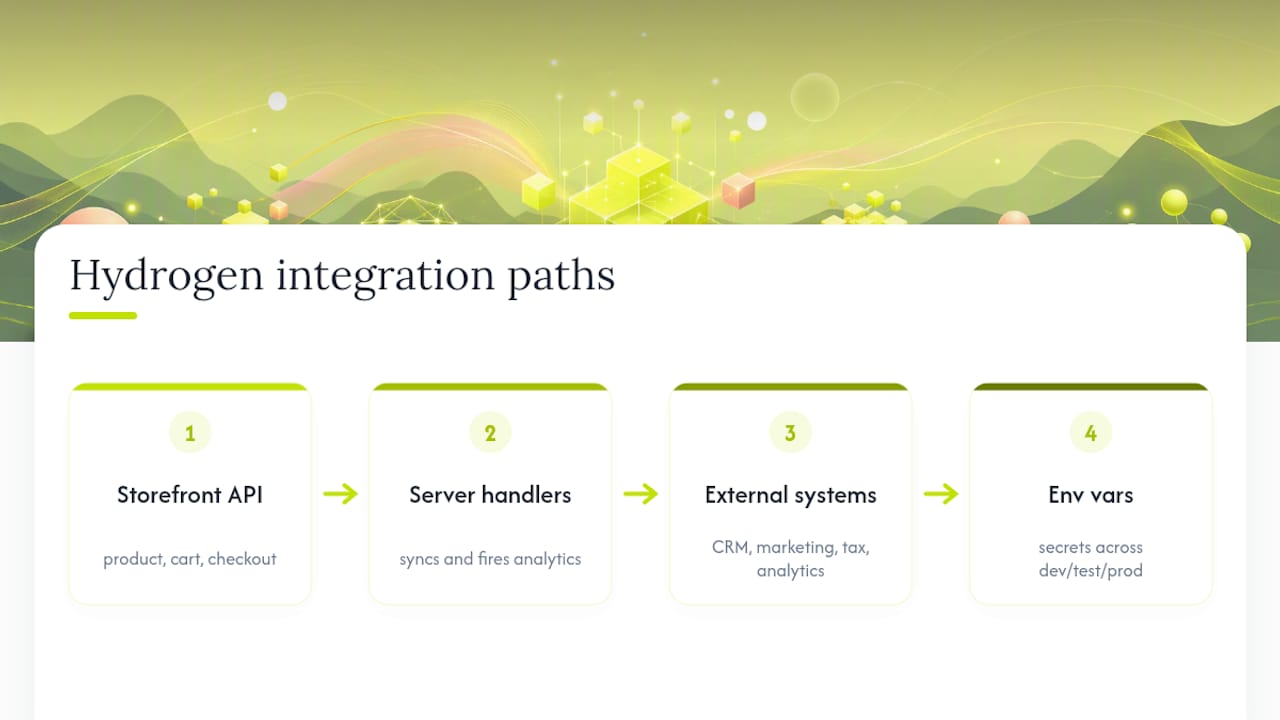
Because Hydrogen’s server-side handlers run before hydration, they’re a natural place to fire off analytics events or sync order data to a CRM without waiting on client-side JavaScript. Teams commonly wire in tools like HubSpot or Salesforce for lifecycle marketing, or connect a data warehouse for attribution reporting that goes deeper than Shopify’s native analytics.
The framework-agnostic direction from the developer preview makes this easier going forward. If your storefront runs on Next.js with Hydrogen’s commerce primitives layered in, you inherit that framework’s existing ecosystem of integrations rather than working around Remix-specific constraints.
Environment variable management becomes the practical bottleneck here. Every third-party service adds another token or secret that needs to exist consistently across local development, mini-oxygen testing, and production Oxygen deployments. Teams that treat this as an afterthought tend to discover the gap during their first production incident, not before.
Practitioner Perspective: Migration and Operational Discipline
Environment separation is where Hydrogen projects usually go wrong first. Keep secrets distinct across local, staging, and Oxygen production, and rotate API tokens on a schedule rather than after an incident. When debugging, check token scope and mini-oxygen connectivity before assuming the Storefront API itself is broken. It rarely is. Managed Oxygen suits most teams; self-host only when runtime limits genuinely block your workload.
— Service
Build and Scale Your Hydrogen Storefront With Quicktoimpress
Most agencies hand you a roadmap and a separate team to build it. Some firms keep the same senior engineers who scope Hydrogen architecture responsible for shipping it, deploying it to Oxygen, and supporting it through the next Storefront API version bump.

Engagements run through three tiers: Core capacity, Growth capacity, and Scale capacity, each priced according to the scale of services offered, respectively. A typical build includes architecture and CI/CD setup, Storefront API integration, connections to your CRM and analytics stack, and ongoing support once the storefront is live. Teams running multiple regional storefronts often lean on Quicktoimpress’s work with multi-location brands for that added complexity. If you’re scoping a Hydrogen build or evaluating whether to self-host versus run on Oxygen, check current pricing or book a scoping call to walk through your specific architecture.
Sources
FAQ
What Is Hydrogen in Shopify?
Hydrogen is Shopify’s developer toolkit for building headless storefronts, combining commerce-specific components (carts, variants, Shop Pay) with server-side handlers for cart and checkout logic. It pairs with Oxygen, Shopify’s managed edge hosting, though deployment elsewhere is possible.
Is Shopify Hydrogen Good for Production Storefronts?
Yes, for teams building Shopify-native commerce experiences where edge performance and first-party primitives save development time. The trade-off is Oxygen’s runtime constraints, including a 10 MB bundle size limit and 30-second CPU cap per request, which matter for workloads with heavy server-side processing.
Is Shopify Hydrogen Free to Use?
The Hydrogen framework itself is open source and free, and Oxygen hosting is included at no extra cost on Shopify plans above Starter, according to Shopify’s documentation. Building and maintaining a production storefront still requires engineering time, whether in-house or through a partner like Quicktoimpress.
What Is the Downside of Building With Hydrogen?
The biggest operational cost is the quarterly Storefront API release cycle, which can introduce breaking changes every three months and requires proactive version pinning and CI validation, per Shopify’s versioning notes. Oxygen’s runtime limits on memory, bundle size, and execution time can also constrain heavier server-side workloads.
How Do I Start a Shopify Hydrogen Tutorial From Scratch?
Run npm create @shopify/hydrogen@latest with Node.js v16.20+ or v18+ installed, then use the Shopify CLI to link your store and set environment variables like PUBLIC_STORE_DOMAIN. Test locally with mini-oxygen before deploying with npx shopify hydrogen deploy, as detailed in Shopify’s getting-started guide.