Action First Workflow Automation: 5 Department Examples & Checklist

Workflow automation connects a trigger, like a form submission or a status change, to an action a computer performs automatically, like sending an approval request or updating a record. This article walks through practical examples across HR, IT, marketing, finance, and sales, plus a short checklist for building and testing your own.
TL;DR:
- Automations that are triggered by status changes are most effective for processes with clear stages, like hiring or procurement.
- The most impactful automation examples include onboarding, expense capture, and invoice processing, which save significant manual labor and reduce errors.
- Selecting the right automation process depends on frequency and impact, prioritizing high-volume, manual, repeatable tasks over infrequent ones.
- Proper implementation requires mapping current workflows, designing exception paths, testing edge cases, and monitoring post-deployment to ensure reliability.
- The choice of automation platform should focus on system compatibility, observability, and governance features, with low-code tools favored for speed and simplicity.
Table of Contents
- What Are the Main Types of Workflow Automation?
- HR Workflow Automation Examples
- IT and Security Automation Examples
- Marketing and Content Operations Automation Examples
- Finance and Procurement Automation Examples
- Sales and CRM Automation Examples
- How Do You Actually Implement a Workflow Automation?
- Which Automation Platform Fits Your Use Case?
- How Do You Measure Automation ROI and Keep It Governed?
- How Quicktoimpress Approaches Automation Without the Fragile Parts
- Our Take on Automating for Outcomes, Not Novelty
- Turn These Examples Into a Working System
- Sources
What Are the Main Types of Workflow Automation?
Most workflow automation falls into four recognizable patterns, and matching your process to the right one saves months of trial and error. Business process automation generally starts here, before anyone touches a specific tool.
- Status-change automation: fires when a record moves from one state to another, like a deal marked “closed won” triggering a new onboarding project.
- Time-based automation: runs on a schedule, like a nightly report or a reminder sent three days before a contract renews.
- Event-based automation: reacts to something happening outside your core system, like a webhook firing when a customer abandons a cart.
- AI-augmented automation: adds judgment to the mix, such as classifying a support ticket by urgency or extracting line items from a scanned invoice before a human ever sees it.
A status-change trigger works well for anything with clear stages, like hiring or procurement. Time-based triggers suit compliance and reporting. Event-based triggers fit real-time customer interactions. AI-augmented steps come in when the decision is too nuanced for a simple rule, but you still want the routing and record-keeping to happen without a person doing it manually.
HR Workflow Automation Examples
HR is often the easiest place to start, because the workflows are repetitive, well-documented, and touch nearly everyone in the company at least once. Onboarding automation is a foundational use case: when a new hire record lands in your HR system, it can automatically provision email and software accounts, notify IT and facilities, and kick off a welcome sequence, cutting out the days-long lag that used to come from manual setup.
- New-hire provisioning: a signed offer letter triggers account creation, equipment orders, and a scheduled welcome email sequence.
- Time-off approvals: a submitted PTO request routes to the direct manager, then syncs approved days to payroll automatically.
- Expense capture: a photographed receipt gets read, categorized, and routed for manager sign-off without manual data entry.
- Status-change updates: a promotion or department transfer updates payroll, benefits, and org charts in one pass instead of three separate tickets.
- Offboarding checklists: a termination date triggers access revocation, asset return reminders, and final paycheck calculations on a fixed timeline.
Expect measurable time savings on each of these, since most of the labor was manual re-entry across disconnected systems, not decision-making.
Pro Tip: If you’re automating candidate screening or resume ranking, keep a human reviewing edge cases and audit the model’s decisions periodically. Bias in automated screening tends to creep in quietly, and it’s far easier to catch in a monthly review than after a hiring complaint.
IT and Security Automation Examples
IT teams live or die by mean time to resolution, and most of the delay isn’t technical, it’s routing. A support form that automatically tags and assigns a ticket based on keywords or category can shave hours off the queue before a technician even looks at it.
- Ticket routing: an incoming request auto-tags by department and skill, landing directly in the right technician’s queue instead of a shared inbox.
- Asset lifecycle tracking: a new laptop assignment automatically updates inventory records and schedules a replacement reminder three years out.
- Compliance reminders: license renewals and required security training trigger automatic nudges to employees and their managers, with a logged audit trail for later review.
- Incident enrichment: when an alert fires, an automation pulls relevant logs, past incident history, and affected system details into the ticket before it’s escalated, so the on-call engineer isn’t starting from zero.
The audit trail matters as much as the speed here. Enterprise platforms that combine robotic process automation with prebuilt connectors to systems like SAP or Salesforce let IT teams scale these flows without losing visibility into who approved what and when. That traceability becomes non-negotiable the moment a compliance auditor asks for it.
Marketing and Content Operations Automation Examples
Marketing teams tend to lose time in two places: waiting for approvals and manually publishing the same content in five different formats. Automating the handoffs, not the creative work itself, is where the real gains show up.
- Creative intake and assignment: a request form automatically assigns a brief to the right designer or writer based on project type and current workload.
- Approval loops: draft content routes to the correct approver tier automatically, with reminders sent if a review sits untouched for more than 48 hours.
- Calendar-driven publishing: scheduled posts sync across the website and social channels the moment a piece is marked approved, no manual copy-pasting required.
- Behavioral drip campaigns: a website visit, download, or product signup triggers a tailored email sequence instead of a generic blast to the full list.
- Version control and QA: an automation flags outdated assets or broken links on a recurring schedule, so nobody discovers a dead link from a customer complaint.
Teams managing high-volume content, especially on WordPress, often find that automating the publishing step alone removes one of the most common bottlenecks between “content approved” and “content live.” The approval loop is usually the bigger win, though, since that’s where work sits idle the longest.
Finance and Procurement Automation Examples
Finance automation earns trust fast because the errors it prevents are expensive and visible. A miscoded invoice or a missed approval threshold isn’t just annoying, it shows up in an audit.
- Invoice processing: optical character recognition extracts line items from a scanned invoice, validates them against a purchase order, codes them to the right general ledger account, and triggers payment once approved.
- Expense policy checks: submitted expenses are automatically checked against policy limits, flagging anything over threshold for manager review instead of relying on someone to catch it manually.
- Purchase order approvals: routing changes based on dollar amount, so a $200 supply order clears instantly while a $50,000 contract goes to a director.
- Vendor onboarding: a new vendor form triggers document collection, tax form verification, and contract routing for e-signature, all before the first invoice ever arrives.
AI-driven document extraction applied to invoice processing has shown measurable time savings and error reduction at scale in enterprise case studies, largely because manual re-keying is where most coding mistakes originate in the first place. If your finance team is still hand-typing invoice totals into a ledger, that’s usually the single highest-ROI automation on this list.
Sales and CRM Automation Examples
Sales teams lose deals in the gaps between systems, not in the pitch itself. A hot lead that sits in an inbox for six hours because nobody claimed it is a solved problem, and it’s been solved for years.
- Lead capture and routing: a form submission is scored automatically and assigned to the right rep based on territory, deal size, or product interest.
- Engagement-triggered follow-ups: a prospect opening a pricing email three times in a week triggers an automatic alert to the assigned rep instead of waiting for the next scheduled check-in.
- Contract-to-onboarding handoff: a signed contract automatically creates an onboarding project, assigns a customer success owner, and schedules the kickoff call.
- Renewal and upsell triggers: usage data or an approaching contract date automatically flags an account for outreach before it becomes a retention emergency.
Revenue operations built around these handoffs prevent the classic failure mode where marketing, sales, and customer success all think someone else owns the follow-up. The automation isn’t replacing the rep’s judgment, it’s making sure the rep gets the signal in time to use that judgment.
How Do You Actually Implement a Workflow Automation?
Picking the right process to automate matters more than picking the right tool. Start with frequency and impact, not novelty.
- Identify candidates: list processes that happen often, involve manual data re-entry, and have clear, repeatable steps. A task done twice a year rarely justifies the build effort; one done fifty times a week almost always does.
- Map the current process: write down every step, who owns each one, and which system holds the data at each stage. This is tedious and worth doing anyway, because half of the friction usually turns up here before you’ve written a single automation rule.
- Define triggers and actions: specify exactly what starts the automation and what it does, including what happens when the data doesn’t fit the expected pattern. Exceptions aren’t failures, they’re a routing decision you need to design for up front.
- Prototype in a sandbox: build the flow in a test environment with real (or realistic) data before it touches production. Define a rollback plan before you launch, not after something breaks.
- Test with edge cases: run the automation against the weird inputs, not just the clean ones, missing fields, duplicate records, unusual formatting.
- Deploy with monitoring: instrument the automation so you can see success rates, failure rates, and processing time from day one.
- Measure baseline vs. post-deployment: compare time spent, error rates, and throughput before and after, so the ROI conversation has real numbers behind it instead of a gut feeling.
Pro Tip: *Build your exception path before your happy path. It’s tempting to design for the clean case and patch exceptions later, but that’s exactly backward.
Process mining tools, increasingly built into platforms like Power Automate, can help surface which steps in a process consume the most time before you commit engineering effort to automating them.
Which Automation Platform Fits Your Use Case?
The tool matters less than the category, and picking the wrong category is the most common reason automation projects stall.
- Low-code / no-code platforms favor speed and accessibility. Zapier connects thousands of apps through prebuilt triggers and actions, with governance features like managed connections and audit logging for scaling across teams.
- Robotic process automation (RPA) works best for repetitive, rules-based tasks inside legacy systems that don’t have modern APIs, think screen-scraping a decades-old finance application.
- Integration platforms (iPaaS) like Power Automate combine cloud flows, desktop RPA, and prebuilt connectors to enterprise systems like SAP and Salesforce, useful when you need both scale and depth.
- Hybrid visual-plus-code platforms such as n8n let technical teams build visually but drop into custom code when an edge case demands it, which reduces the workaround debt that piles up on purely visual tools. Make occupies similar territory, with a visual builder that supports more complex branching logic than most no-code tools allow.
- AI-enabled agents add judgment, classifying, summarizing, or extracting data, layered on top of any of the above categories rather than replacing them.
Before committing to one, check connector availability for your core systems, how granular the permission controls are, whether you can see execution logs when something fails, and what service-level commitments the vendor actually offers. A platform with beautiful workflow design and no observability will bite you the first time a silent failure costs you a week of missed invoices.
How Do You Measure Automation ROI and Keep It Governed?
Time saved is the easiest metric to track, and usually the first one worth reporting to leadership. Multiply hours saved per instance by how often the process runs and by your team’s fully loaded hourly cost, and you get a defensible annual savings figure without needing a finance degree.
| Metric | What it measures | How to track it |
|---|---|---|
| Time saved | Hours no longer spent on manual steps | Compare average completion time before and after automation |
| Error reduction | Drop in mistakes requiring rework | Count corrections or rejected records per month |
| Cycle time | Speed from trigger to completion | Timestamp start and end events in the workflow log |
| Percent automated | Share of volume handled without human touch | Divide automated instances by total instances processed |
Governance keeps these gains from quietly eroding. Role-based access limits who can modify a live automation, audit logs record every change and execution, and a clear exception-routing path ensures unusual cases land with a human instead of failing silently. If any part of your workflow involves AI making a judgment call, especially in hiring or credit decisions, build in a periodic bias review. Skipping that step is how a time-saving automation turns into a legal liability.
How Quicktoimpress Approaches Automation Without the Fragile Parts
Most failed automation projects share the same root cause: the person who designed the workflow and the person who built it never talked. A marketing lead maps out an ideal lead-routing flow, hands it to an IT contractor, and three months later it breaks the first time a lead comes in through an untested channel.
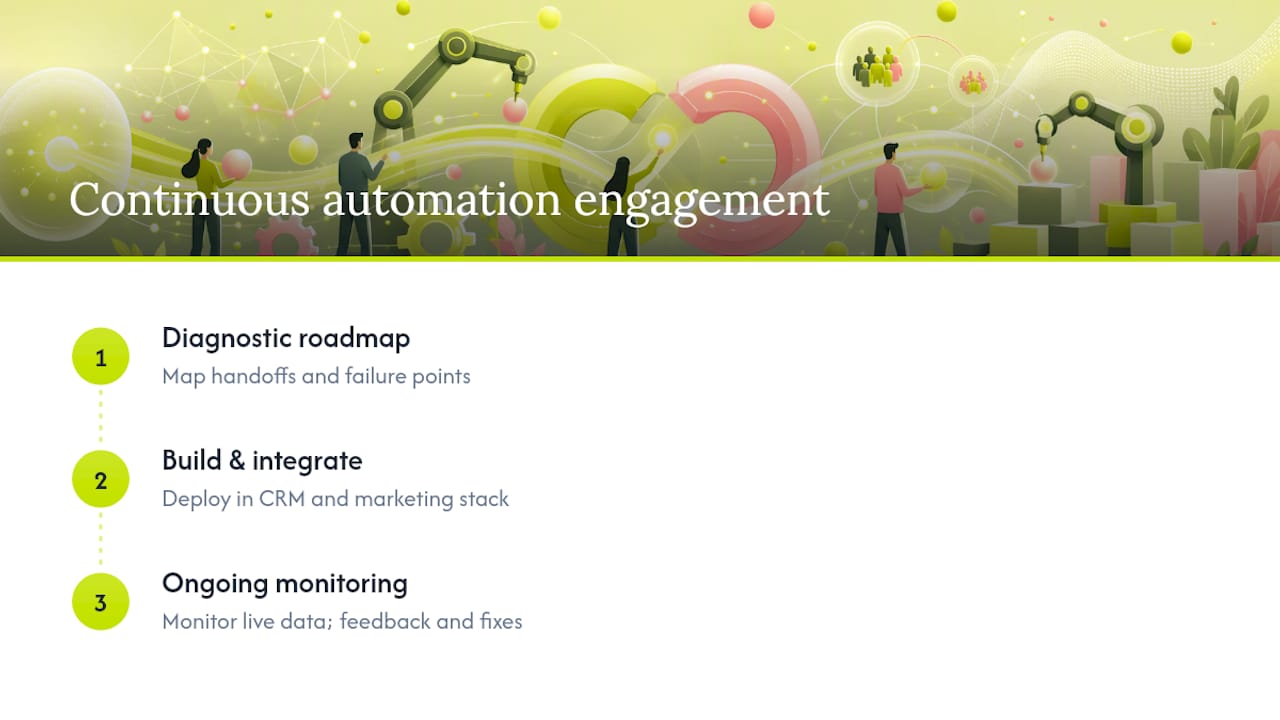
Quicktoimpress avoids that gap by keeping strategy and engineering in the same room. The people who diagnose where a workflow breaks down are the same people building the fix, connecting revenue operations, CRM data, and site engineering so a change in one system doesn’t quietly orphan a process in another. A typical engagement starts with a diagnostic roadmap that maps existing handoffs and failure points, moves into implementation across the specific CRM and marketing stack in use, and continues with monitoring once the automation is live, not a one-time handoff followed by silence.
That continuity is what prevents the classic failure mode: an automation that works perfectly in the demo and quietly falls apart the first time real, messy data hits it.
Our Take on Automating for Outcomes, Not Novelty
The biggest mistake we see teams make isn’t picking the wrong tool, it’s automating the wrong thing. A flashy AI-powered workflow that saves four minutes a week isn’t worth the maintenance burden, while a boring status-change trigger that eliminates a daily manual export can be worth hundreds of hours a year. Impact and frequency should decide what gets built first, not what looks impressive in a demo.
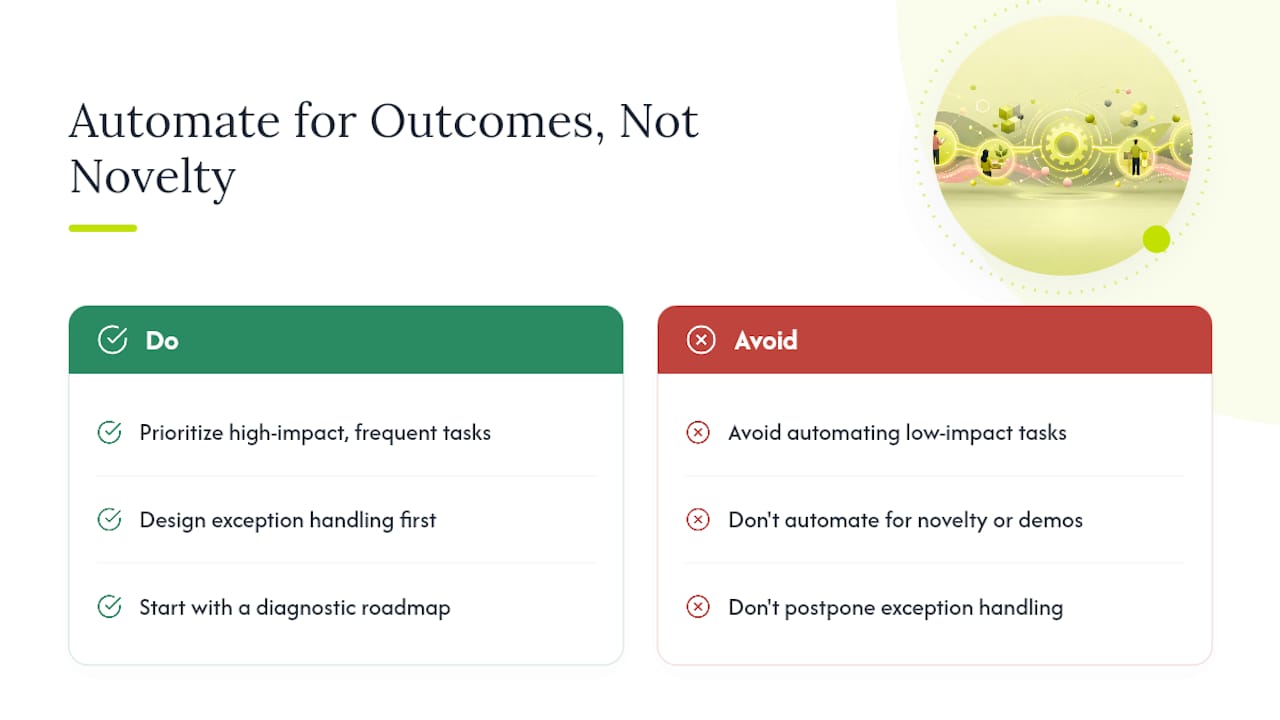
We also think exception handling gets treated as an afterthought far too often. The automations that actually hold up under pressure are the ones where someone sat down and asked, “what happens when this data doesn’t match the pattern?” before writing a single trigger. Skip that question, and you’ll find out the hard way, usually during a busy quarter, exactly when you can least afford it.
If you’re weighing where to start, we’re glad to walk through a diagnostic roadmap and point out where the highest-impact automation opportunities actually sit in your current stack.
— Service
Turn These Examples Into a Working System
Reading about automation examples is one thing. Getting them to actually run reliably across your CRM, your site, and your finance tools without breaking every time a field changes name, is a different problem entirely. Quicktoimpress builds the connective tissue between those systems instead of dropping in a single automation and walking away.

Our revenue operations work covers lead routing, onboarding handoffs, and renewal triggers built directly into your CRM and marketing stack. Our AI search and automation capability handles the more judgment-heavy flows, ticket classification, document extraction, and content operations, with the observability layered in from day one so you’re not debugging a black box six months later. Every engagement starts with a diagnostic that maps your current handoffs before we touch a single trigger, so the roadmap reflects your actual systems, not a generic template.
If any of the examples above sound like problems you’re currently solving with a spreadsheet and a prayer, get in touch with Quicktoimpress to start that diagnostic conversation.
Sources
- Top opportunities for HR leaders: how AI is reshaping employee onboarding — DocuSign
- Zapier: Build and Govern AI Workflows, Agents, and Apps
- Power Automate: Business Process Workflow Automation | Microsoft Power Platform
- AI Workflow Automation Platform - n8n